
You open a shared folder to send a contract for approval and find six files that all look plausible. One says Final, another says Final2, another says Final_EDITED, and one has a date from last week that might be newer than the others. Someone added comments by email, someone else edited a PDF locally, and now nobody wants to be the person who sends the wrong version out for signature.
That mess isn't a file naming problem alone. It's an operations problem. When teams don't have a working system for document version control, they lose time, rework the same changes, and create avoidable risk around approvals, signatures, and audits.
The urgency is getting worse. Microsoft's 2025 Work Trend Index reported that 75% of knowledge workers use AI at work and 46% say they use it to speed up document drafting and editing, which means more near-identical files can be created in less time, not less confusion, as cited in this ShareFile summary of the finding. If you're already juggling Google Docs, Word files, PDFs, and signature-ready copies, AI speeds up the churn unless your process is tighter than your tools.
If your work includes proposals, HR packets, policies, contracts, or anything that ends in approval, version control is one of those boring disciplines that still saves you from expensive mistakes. Teams that also need signing workflows usually run into the problem even faster, especially when they move between drafts and signed files in tools like Google Docs before sending the final copy out through an e-signature workflow. If that's your current setup, this guide on how to eSign on Google Docs shows why the handoff matters.
Table of Contents
- Moving Beyond 'Finalv2EDITEDFinal.docx'
- What Is Document Version Control Really?
- Comparing Document Versioning Approaches
- How to Implement a Version Control Policy
- Best Practices for High-Performing Teams
- The Critical Link to E-Signature Workflows
- Common Pitfalls and How to Avoid Them
Moving Beyond 'Final_v2_EDITED_Final.docx'
A busy team rarely breaks document control in dramatic fashion. It breaks it one shortcut at a time. Someone downloads a copy to make “just one change.” Someone replies to an old email attachment. Someone names a file “latest” and assumes everyone else will understand what that means.
That's how shared folders turn into quiet traps. Sales sends an outdated proposal. HR routes the wrong policy draft. Legal reviews redlines on one version while leadership approves another. By the time someone asks, “Which one is current?”, the team has already lost momentum.
Why this gets worse as teams move faster
AI-assisted drafting makes this more obvious. A manager asks for a shorter contract summary, then a customer-facing version, then a version with softer language, then a cleaner draft for signature. Each one looks almost the same. That sounds efficient until nobody can tell which edits were approved and which were generated as experiments.
The more quickly teams can create document variants, the more disciplined they have to be about deciding which version is real.
Good document version control fixes that by making version decisions explicit. It tells the team which file is a draft, which one is under review, which one was approved, and which one is the executed record. It also makes clear who changed what, and when.
What changes when the process is professional
The immediate benefit isn't technical elegance. It's operational calm. People stop guessing. Reviewers stop wasting time reopening old attachments. Approvers know what they're approving. New team members can follow the trail without asking for a verbal history of every file.
A good system also cuts out false confidence. “It was in the shared drive” isn't the same as “it was the approved version.” Once teams accept that difference, they stop treating version control like admin overhead and start treating it like decision control.
What Is Document Version Control Really?
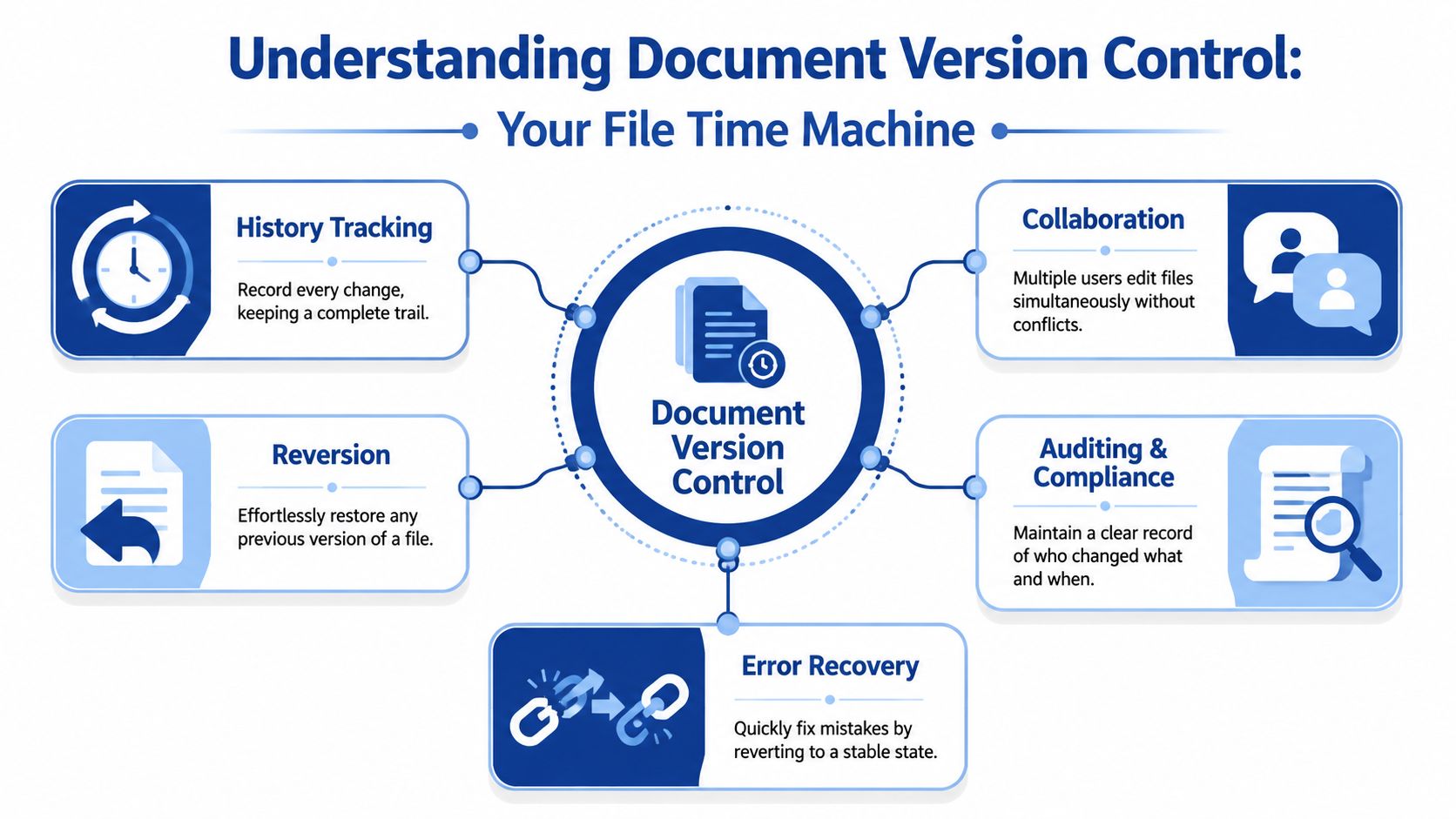
The simplest way to think about document version control is this. It's a time machine for business documents, but one with rules. You can move backward, compare states, confirm who changed something, recover an earlier file, and identify which version is the authoritative one right now.
A lot of teams think version control means keeping old copies. That's part of it, but it's not enough. A folder full of saved drafts is storage. Document version control is a managed history.
To ground that idea, this visual sums up the system well.
It is a record, not a pile of copies
Harvard Biomedical Data Management describes version control as a standardized system for tracking file versions so collaborative work can proceed smoothly, and notes that it allows multiple people to work on a project simultaneously while improving accountability, as explained in Harvard's version control guidance.
That definition matters because it shifts the focus from files to behavior. If multiple people can edit at once, someone has to know which changes count. If accountability matters, the team needs more than memory and chat messages.
In practice, a reliable system does three jobs at once:
- Preserves snapshots so drafts, review copies, and approved versions don't blur together
- Captures history so edits aren't anonymous or disconnected
- Establishes authority so one location or record acts as the source of truth
A usable system needs three things
The first is versioning. A document changes, and the system records a distinct state. Not “sort of updated.” Not “probably current.” A specific version.
The second is history tracking. You need to know who made the change, when it happened, and why it happened. Otherwise the team can restore an earlier file but still won't understand whether they should.
Later in the lifecycle, seeing the mechanics in motion helps. This short walkthrough is useful if you want a visual explanation of how controlled revision history works in practice.
The third is a single source of truth, a concept many teams fail to implement. They have version history in one tool, comments in another, signed PDFs in email, and redlines saved locally. At that point, the “system” is really just scattered evidence.
Practical rule: If two people can each point to a different file and reasonably claim it is the current version, you don't have document version control yet.
Comparing Document Versioning Approaches
Different teams need different levels of control. A freelancer sending occasional proposals doesn't need the same setup as an HR team routing onboarding packets or a legal team managing contract revisions. The mistake is assuming there's one best method for everyone.
Manual naming conventions
This is the starting point for many small teams. Files get names like Proposal_v0.1, Proposal_v0.2, Proposal_v1.0. If people are disciplined, it can work surprisingly well for low-volume workflows.
The upside is simplicity. There's no new software to buy, train, or integrate. The downside is that it depends almost entirely on human consistency. One person forgetting the naming rule can create confusion fast.
Best fit: solo operators, very small teams, low document volume.
Built in cloud version history
Google Drive, Google Docs, Microsoft 365, Dropbox, and similar tools give teams automatic version histories and collaborative editing. Many growing teams should begin with these tools, because they remove a lot of manual friction without requiring a full document management platform.
The trade-off is governance. Built-in history tells you what changed, but it doesn't automatically solve approval discipline, release states, or signature readiness. Teams still need naming rules, folder structure, and clear ownership.
Best fit: small and mid-sized teams that collaborate often and need light process control.
Dedicated document management systems
A dedicated DMS adds stronger controls around permissions, workflows, review states, retention, and structured archives. This is usually the right move when documents are operationally sensitive and lots of people touch them across departments.
The trade-off is adoption. A powerful system that people bypass is worse than a simpler system they use. DMS tools also require setup work, clear permissions, and policy enforcement.
Best fit: teams with formal approvals, controlled records, or higher compliance pressure.
Git style version control
Git is excellent for text-based version control and detailed change tracking, but it's rarely a practical choice for general business documents like PDFs, contracts, forms, or presentation files. It shines with developers and technical teams, not with most document-heavy operations groups.
Its advantage is precision. Its disadvantage is usability for nontechnical users and poor fit for many binary document formats.
Best fit: engineering-adjacent documentation or highly technical text workflows.
Comparison of Document Version Control Methods
| Method | Best For | Pros | Cons |
|---|---|---|---|
| Manual naming conventions | Freelancers, solo consultants, low-volume admin work | Easy to start, no extra software, clear if everyone follows the rule | Breaks with inconsistent naming, weak auditability, easy to overwrite or duplicate |
| Built in cloud version history | Small teams, startups, collaborative office work | Real-time collaboration, automatic history, easier recovery of earlier drafts | Doesn't solve approval governance by itself, can create confusion around “approved” vs “edited” |
| Dedicated document management systems | HR, legal, finance, operations teams with structured reviews | Better permissions, stronger process control, more formal records handling | More setup, training, and administration |
| Git style version control | Technical teams managing text-heavy documentation | Precise change tracking, strong branching and rollback | Too complex for most business users, poor fit for common office document formats |
The best system is the one your team will actually follow under deadline pressure, not the one that looks most sophisticated in a demo.
A practical way to choose is to ask three questions. How many people touch the same document? How costly is it if the wrong version gets used? At what point does that document become binding, approved, or externally visible? Your answers will usually point to the right level of control.
How to Implement a Version Control Policy
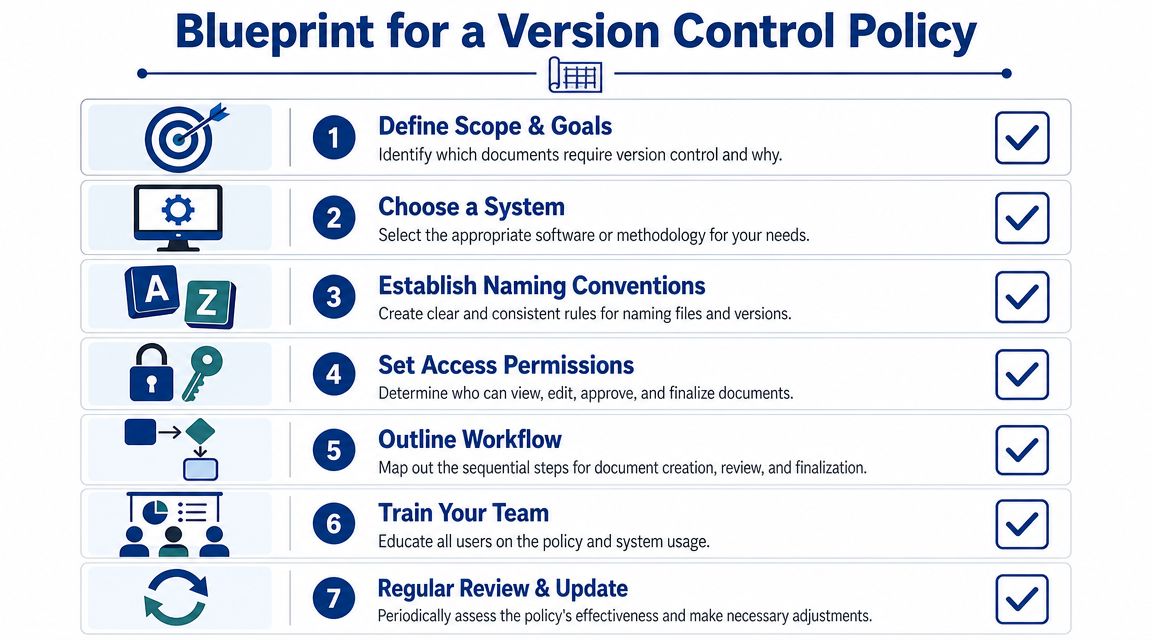
A version control policy only works when it answers the messy, ordinary questions your team runs into every week. Who can edit? Who can approve? What counts as a new version? Where does the final signed copy live? If the policy dodges those questions, people will make up their own rules.
Start with scope and ownership
Begin by deciding which documents need formal document version control. Contracts almost certainly do. HR forms, policy documents, statements of work, pricing sheets, and client deliverables usually do too. A lunch menu draft probably doesn't.
Then assign roles. Keep it plain:
- Owner handles the master document and decides when a revision is official.
- Editors can propose changes.
- Approver confirms the file is ready to move out of review.
- Sender routes the approved version for external use or signature.
If one person fills multiple roles, that's fine. What matters is that the responsibilities are clear.
Choose a numbering rule people can follow
Formal guidance from NCCIH recommends a semantic scheme where draft iterations increment by 0.1 and the first final version becomes 1.0, creating a clear distinction between pre-final review cycles and approved baselines, as shown in the NCCIH version control guidelines.
For most business teams, that structure is better than vague labels like “latest” or “updated.” A working rule might look like this:
Drafts use 0.x
Example: Client_MSA_v0.1, v0.2, v0.3First approved version becomes 1.0
That marks the document as ready for external useMajor approved revisions move to the next whole number
Example: v2.0 after substantive changesMinor controlled edits use the decimal
Example: v1.1 or v1.2, if your process distinguishes them
The goal isn't mathematical elegance. It's immediate clarity.
Lock the handoff from approval to signature
One additional rule is often necessary. Once a version is approved for signature, nobody edits that file. If changes are needed, the team creates a new version and restarts the approval path.
That single rule prevents one of the most common failures in document workflows, where the file that got approved is not the file that got signed.
For teams that occasionally need to route a clean final file without paying for a full stack of software, even a simple tool like this free e-signature tool can help reinforce the discipline of sending one approved artifact instead of circulating loose attachments.
Best Practices for High-Performing Teams
A policy sets the rules. Team habits decide whether those rules survive contact with real work. The strongest teams don't just store versions correctly. They make the history readable, keep the workflow clean, and reduce the chances that someone has to guess.
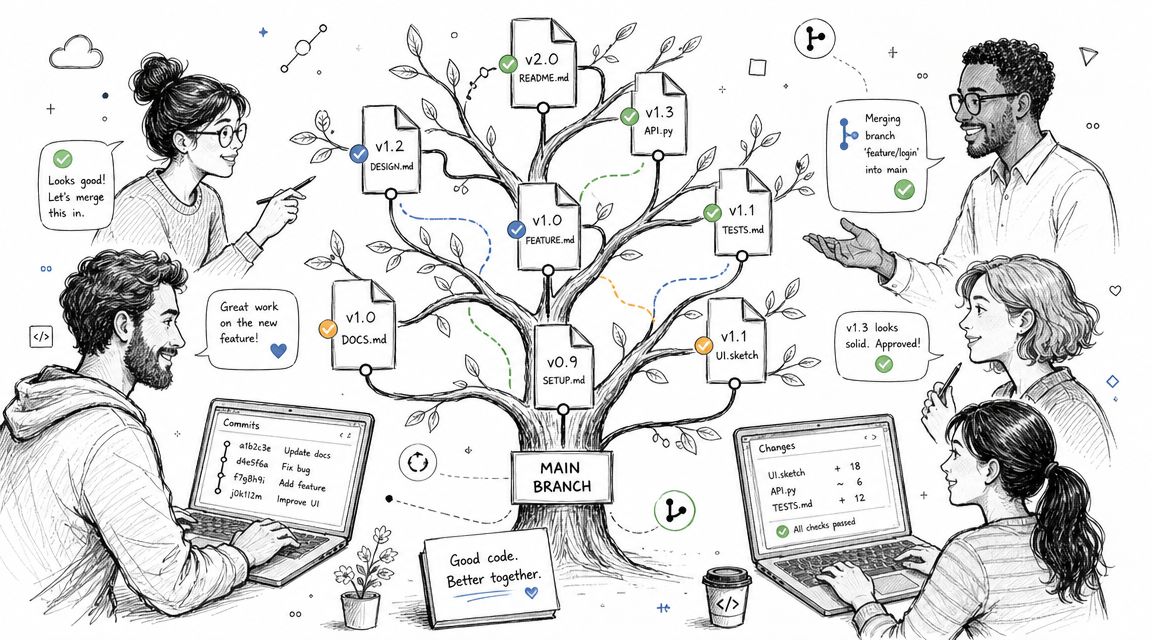
Write change notes like another person will need them
Bad change notes say “updated” or “revised.” Good ones clearly state what changed. “Updated indemnity clause after legal review” is useful. “Revised onboarding checklist for remote hires” is useful. Six months later, those notes save time.
Teams that do this well also separate comments from decisions. Discussion can live in comments. The reason a version changed should live in the version record itself.
“If a person outside the project can't understand why the version changed, the log isn't finished.”
Keep history visible inside the document
The University of Aberdeen recommends keeping a version control table on a document's front page to record the author, date, and status of each change, and explicitly advises against overwriting earlier versions in order to preserve a traceable history, according to the University of Aberdeen guidance.
That advice is still practical. Even if your platform stores metadata, an internal version table helps when documents get exported, shared as PDFs, or reviewed outside the original system.
A simple front-page table can track:
| Version | Date | Author | Status | Summary |
|---|---|---|---|---|
| v0.1 | 2025-05-01 | J. Lee | Draft | Initial draft |
| v0.2 | 2025-05-03 | J. Lee | In review | Added payment terms |
| v1.0 | 2025-05-06 | M. Patel | Approved | Final approved version |
Archive without hiding the truth
High-performing teams don't delete history just to make folders look tidy. They archive superseded versions, mark them clearly, and keep active folders focused on current work.
Three habits help a lot here:
- Archive by status instead of random date dumping. “Superseded,” “Executed,” and “Reference” are clearer than “Old.”
- Restrict editing on prior approved versions so nobody makes unauthorized changes to a baseline.
- Review clutter on a schedule so folders don't become archaeological sites.
The point isn't to preserve every stray experiment forever. It's to preserve the decision trail that matters.
The Critical Link to E-Signature Workflows
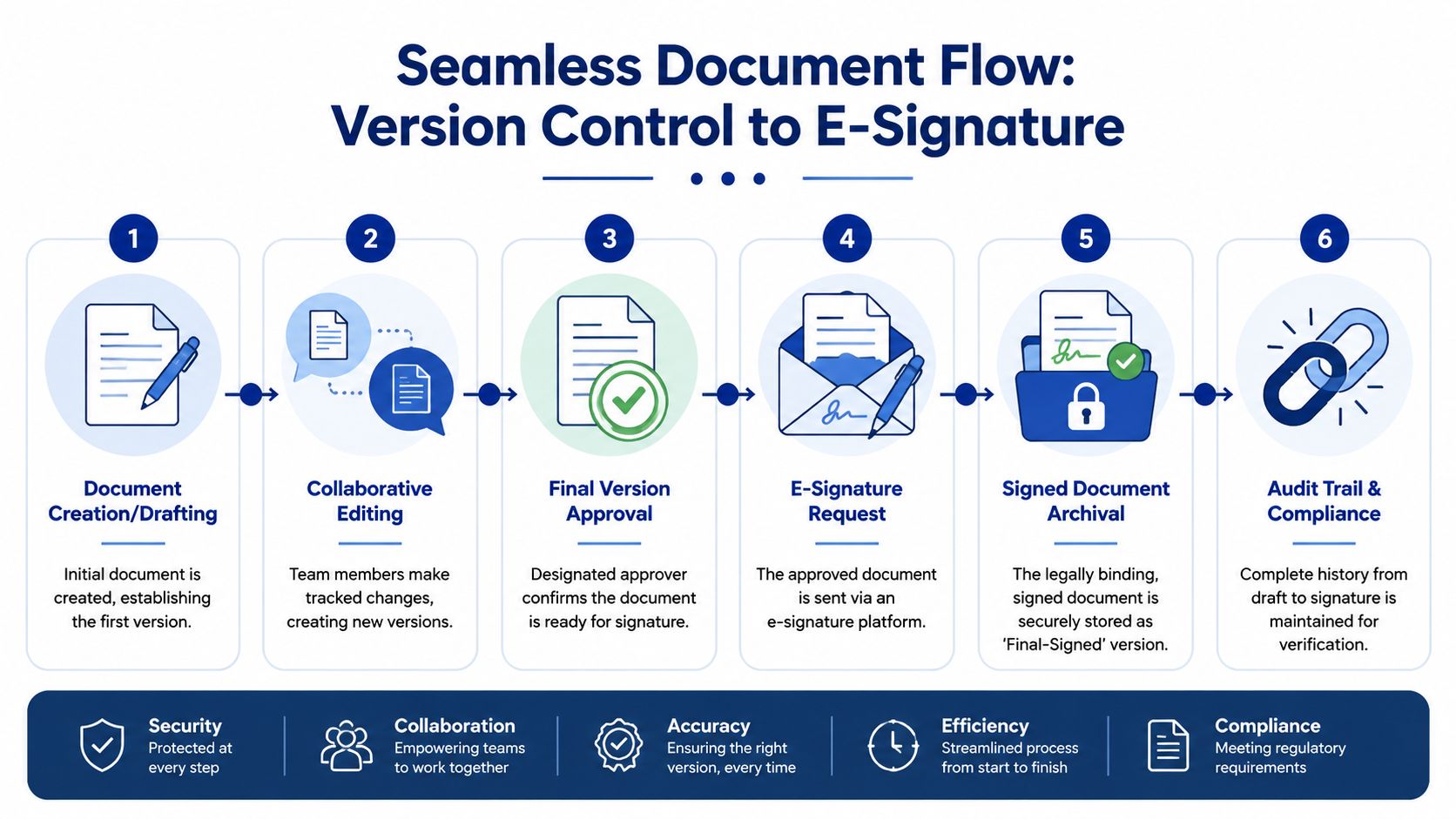
Most articles about document version control stop too early. They explain drafts, naming, and revision history, then assume the process is done once a file is “final.” For contracts, approvals, and business records, that's not the end. The critical moment is the handoff from approved draft to executed copy.
Adobe's general guidance highlights a common gap in version control thinking: teams need a clear source of truth for the final signed artifact, not just a history of drafts, as noted in Adobe's discussion of document version control.
Draft complete is not process complete
Operational mistakes frequently lead to legal and commercial problems. A team approves one version internally, then sends an older PDF for signature because it was easier to find. Or someone makes “one last small edit” after approval and sends that instead. Or multiple signed copies exist, and nobody can say which one is the executed record.
Those aren't edge cases. They're what happens when version control ends before the signature step begins.
For teams working with PDFs, a practical part of that handoff is making sure the signature-ready file is properly structured before it goes out. This guide on adding a digital signature block to a PDF is useful because it forces the team to treat the signable document as a controlled artifact, not just another draft.
What the final handoff should look like
A dependable workflow usually follows this sequence:
- Draft and revise in the team's working environment.
- Approve one named version as signature-ready.
- Freeze that version so edits require a new revision number.
- Send only that approved file into the e-signature flow.
- Archive the signed output as the executed record, separate from drafts.
A signed document should never be “one of several finals.” It should be the final executed record with a clean path back to the approved version that produced it.
If your team relies on e-signatures, this isn't just admin discipline. It's governance. The signed file becomes the business record people use later in disputes, audits, renewals, onboarding, billing, and enforcement. The transition from draft to signed copy has to be controlled.
Under U.S. requirements, the compliance point to note is ESIGN Act and UETA. For operational teams, that means the version sent for signature and the archived signed record should be handled as the definitive transaction trail, not as a casual attachment somebody happened to email.
Common Pitfalls and How to Avoid Them
Most version control failures come from habits people defend as “good enough.” They aren't.
- Don't use casual file names. “Final,” “latest,” and “newest” age badly. Use a numbering scheme and status label people can read at a glance.
- Don't let everyone invent their own storage pattern. Pick one source of truth. If files live in inboxes, downloads, desktops, and shared drives at the same time, confusion is built in.
- Don't overwrite old versions. Keep prior states available when they matter. Without history, rollback becomes guesswork.
- Don't treat approval as the same thing as execution. An approved draft is not a signed record. Control that handoff.
- Don't edit a signed document. If terms change after signing, create an amendment or a new version. Never replace the executed copy.
- Don't choose a system your team won't use. A lightweight process followed consistently beats an elaborate setup everyone works around.
The strongest document version control process is usually the one that makes the right action the easy action. Clear names. Clear ownership. Clear approval state. Clear signed record.
If you need a simple way to send the approved version for signature and keep a clear audit trail, SignWith is built for exactly that handoff. It supports legally binding e-signatures under the ESIGN Act and UETA, lets teams send documents without subscriptions, and helps turn the right final version into the executed record you can trust later.
