
A client signs up for your workshop, books your rental, joins your gym, or walks onto your property for an event. Then something goes wrong. A slip. A strain. A damaged item. Suddenly the conversation shifts from customer service to blame.
That's the moment many business owners realize a liability release form isn't paperwork for later. It's part of the job before anyone participates.
Finding a template online takes minutes. The hard part isn't finding a form. It's using one that has a real chance of holding up when someone challenges it. That comes down to wording, scope, process, and proof of consent. If any of those are weak, the signed document may still leave you exposed.
Table of Contents
- Why Every Business Needs a Liability Shield
- Understanding Different Types of Liability Waivers
- The Anatomy of an Ironclad Waiver Form
- Making Your Liability Release Legally Binding
- How to Draft and Customize Your Waiver
- Secure E-Signature and Storage Workflow
- Frequently Asked Questions About Liability Waivers
Why Every Business Needs a Liability Shield
A liability issue usually starts as an ordinary business day. A photographer hosts a beginner shoot in a public park. A fitness coach runs a small outdoor class. A real estate agent schedules a property walk-through on a wet afternoon. Nobody expects the claim at the start of the day.
Then a participant gets hurt, or says they were never warned about the risk, or argues that your staff caused the problem. At that point, your memory of the conversation won't protect you. Your intake email won't either. What matters is whether you gave clear notice, whether the person agreed to the terms, and whether you can prove it.
That's why a liability release form matters. In plain language, it's a document where one party agrees to release another from certain claims tied to an activity, event, incident, or settlement. For a small business, it acts like a shield only if it's written clearly and signed properly.
A waiver is most useful before trouble starts. After an incident, people remember risk disclosures very differently.
Many owners treat the form like a checkbox. That's a mistake. A weak waiver can create false confidence, especially when it uses generic language that doesn't match the actual activity. Courts don't look at whether you downloaded a form. They look at whether the signer had clear notice of what rights they were giving up and whether the agreement functions like a real contract.
The practical takeaway is simple:
- Use it early: Get the form signed before participation starts, not after someone is already invested.
- Match it to the activity: A gym waiver, event waiver, and property access waiver shouldn't read the same.
- Pair it with operations: Staff instructions, safety rules, and recordkeeping support the form instead of undermining it.
For most businesses, the waiver isn't your only protection. It's one layer in a broader risk-management system. But it's often the first layer a claimant sees, and the first one your business has to defend.
Understanding Different Types of Liability Waivers
A liability release form works like a shield, but not every shield is built for the same job. The right form depends on what you're trying to protect against. A release used to settle an accident claim after damage has already happened serves a very different purpose than a waiver signed before a customer joins a class or enters a restricted area.
What the form actually does
A liability release form is generally treated as a binding contract in the United States when it's clear and understandable. It identifies the signer as the releasor and the business as the releasee, and it can bar later claims tied to the incident or activity, including unforeseen ones if the wording is broad enough, as explained in Workday's overview of general releases of liability.
That distinction matters in practice. If you run a business, you're usually not asking someone to sign “legal paperwork.” You're asking them to acknowledge risk and agree on who carries it.
A few common situations call for different release styles:
- Pre-activity participation: Gyms, workshops, tours, fitness sessions, rentals, and events.
- Post-incident settlement: Property damage, minor accident claims, or insurance-related resolutions.
- Access-based risk: Construction walk-throughs, private property entry, or vendor access to hazardous spaces.
Common liability release forms and their uses
| Waiver Type | Primary Use Case | Example Audience |
|---|---|---|
| General Release | Resolving a dispute or claim after an incident | Small business owners, insurers, contractors |
| Activity Waiver | Releasing claims tied to a specific activity with known risks | Gym owners, workshop hosts, tour operators |
| Event Participation Waiver | Covering attendees, volunteers, or participants at an event | Event organizers, nonprofits, HR teams |
| Property Access Waiver | Addressing risks tied to entering or using property | Real estate agents, landlords, vendors |
| Accident Claim Waiver | Settling liability after injury or damage has already occurred | Service businesses, drivers, property owners |
| Contractor or Vendor Release | Allocating risk when outside parties perform services | Small companies hiring freelancers or vendors |
The mistake I see most often is using a general release where an activity waiver belongs. A general release is often drafted around a past incident. An activity waiver needs to describe the risks of participation before the activity begins.
If the form doesn't name the activity or incident with enough precision, you're asking the signer to waive something they may argue they never understood.
That's why the label at the top of the form matters less than the substance inside it. Call it a waiver, release, hold harmless agreement, or participation form if you want. What counts is whether the document clearly states who is protected, what risks are involved, and what claims are being released.
The Anatomy of an Ironclad Waiver Form
A strong waiver isn't long for the sake of being long. It's specific where it needs to be specific. It closes obvious gaps without burying the signer in unreadable legal jargon.
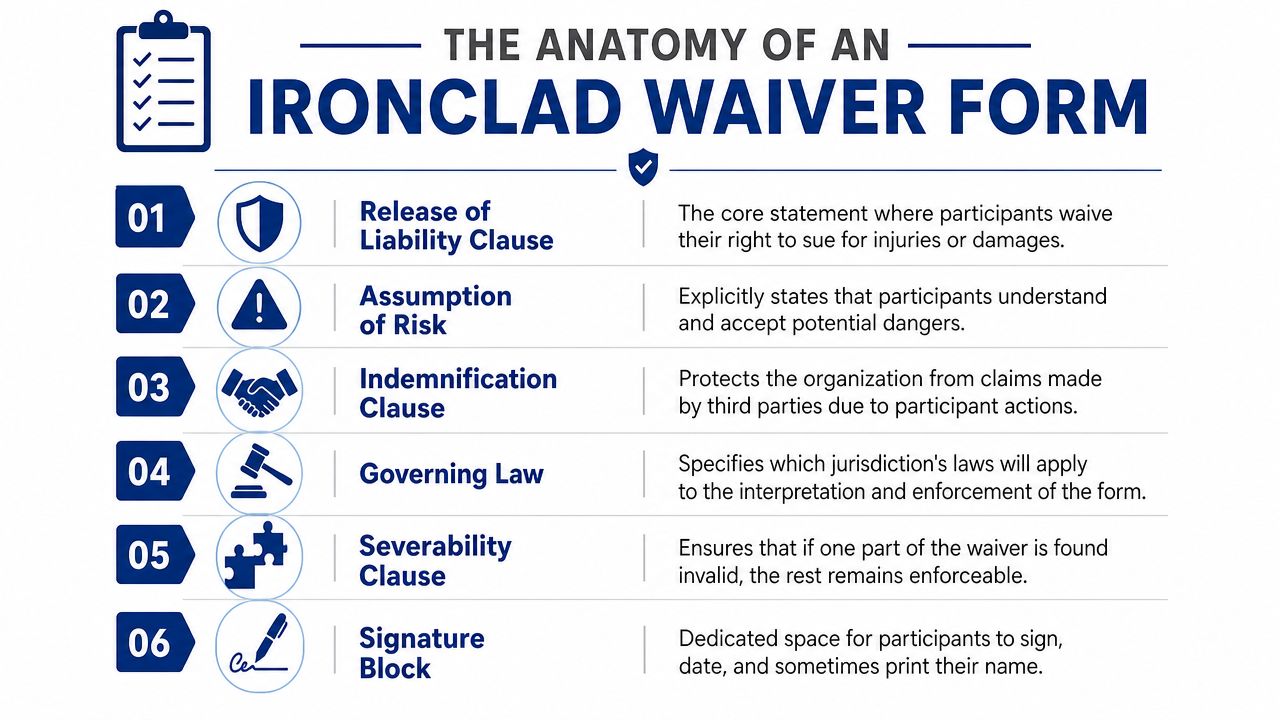
The clauses that carry the weight
Strong waivers use specific-risk language, expressly list hazards, include an assumption-of-risk statement, and can extend the release to agents and volunteers. That drafting approach helps close loopholes that otherwise leave room for claims based on omitted risks or related parties, as discussed in LegalZoom's guidance on release forms.
Here are the parts that usually do the main work:
- Release of liability: This is the core promise. The signer agrees not to pursue certain claims against the business.
- Assumption of risk: The signer acknowledges the activity has risks and chooses to participate anyway.
- Indemnification: This can require the signer to cover losses if their actions trigger a third-party claim.
- Covered parties: Don't stop at the company name if staff, contractors, volunteers, or affiliates also need protection.
- Governing law: This states which jurisdiction's law controls interpretation of the form.
- Severability and entire agreement: These clauses help preserve the rest of the document if one part is challenged and reduce arguments based on side conversations.
If you're building a digital version, the signing area deserves the same attention as the legal text. A vague sign-off at the bottom of a PDF creates unnecessary problems. This guide on how to add a digital signature block to a PDF is useful if you need the signature section to be clear and deliberate rather than tacked on.
Sample language that is clearer than boilerplate
The wording below isn't a substitute for legal review. It does show the difference between generic text and language that tells the signer what they are agreeing to.
Release clause
I release and discharge the business, its owners, employees, contractors, agents, and volunteers from claims arising out of my participation in the described activity, except where prohibited by applicable law.
Assumption of risk
I understand that participation involves known and unknown risks, including the specific hazards described in this form, and I voluntarily accept those risks.
Notice what makes these useful. They identify the protected parties. They tie the release to a described activity. They don't rely on vague phrases like “any and all things that may happen” without context.
An indemnification clause often sounds harsher, but it has a clear purpose.
If my conduct causes a claim by another person, I agree to be responsible for resulting costs the business incurs to the extent allowed by law.
That kind of clause won't fit every consumer-facing business. It may make more sense in vendor, contractor, or higher-risk operational settings than in a simple class registration form. The right approach depends on your audience and the actual exposure.
Making Your Liability Release Legally Binding
A signed form can still fail if the document is sloppy or the signing process is weak. Enforceability turns on details. That includes what the document says, how obvious the waiver is, whether value is exchanged, and whether the signer had a fair chance to understand what they were accepting.
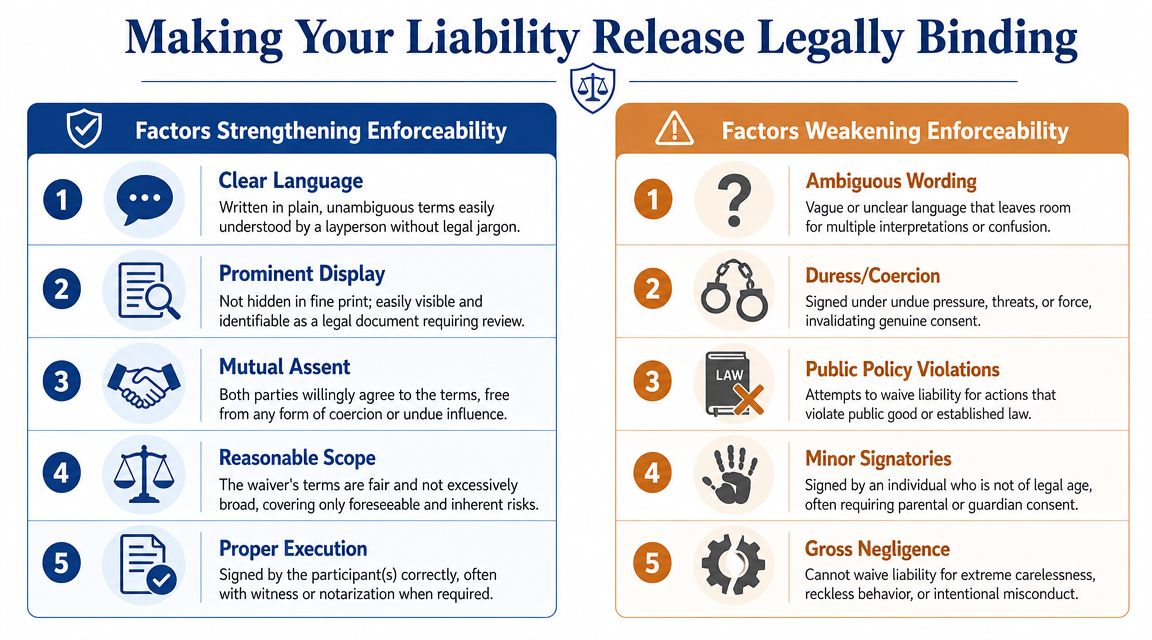
What makes a waiver defensible
For a liability release to be defensible, it should precisely identify the parties, describe the activity, state the governing law, and record consideration, meaning the compensation or value supporting the agreement, as outlined in LawDepot's release of liability guidance.
That sounds technical, but the practical meaning is straightforward. A court wants to see that the signer knew what they were giving up and what the agreement covered.
The forms that tend to hold up better usually share these traits:
- Clear notice: The waiver is easy to spot and reads like a legal agreement, not hidden fine print.
- Specific activity description: “Fitness training using free weights and cardio equipment” is better than “physical activity.”
- Defined parties: Name the business and the categories of people or entities the release also protects.
- Real consideration: The customer gets participation, access, settlement, use of a facility, or another identifiable benefit.
- Reasonable scope: Broad enough to address actual risk, not so bloated that it looks detached from reality.
Practical rule: If an ordinary customer can't explain what they just signed, your form is probably weaker than you think.
Where waivers stop working is just as important. A release may not protect against every kind of misconduct. Many business owners overreach by stuffing in language that tries to waive everything under the sun. That can backfire. If your operations look careless, the form won't rescue bad practices.
Why your signing process matters as much as the text
Electronic signatures are valid when the process creates a reliable record of consent and follows the applicable rules. For U.S. businesses, that means paying attention to compliance with the ESIGN Act and UETA.
If you send waivers digitally, don't treat the e-signature step as a convenience feature only. It's also part of your evidence. The strongest workflow shows who signed, when they signed, what version they saw, and what final document was completed. If your team also handles confidentiality agreements, this practical guide to eSign an NDA helps illustrate how enforceability depends on both document language and execution.
A defensible digital process usually includes:
- Signer identification: You should know which participant completed which form.
- Time-stamped completion records: Timing helps establish sequence and consent.
- Final copy retention: Keep the exact version that was signed.
- Consistent presentation: The signer should see the waiver terms clearly before signing.
Paper can work. Digital can work. What fails is a messy process where nobody can show the final signed record or explain how consent was captured.
How to Draft and Customize Your Waiver
Most businesses should start with a template, but nobody should stop there. The fastest way to weaken a liability release form is to use generic language that doesn't match the activity, the audience, or the actual risk.
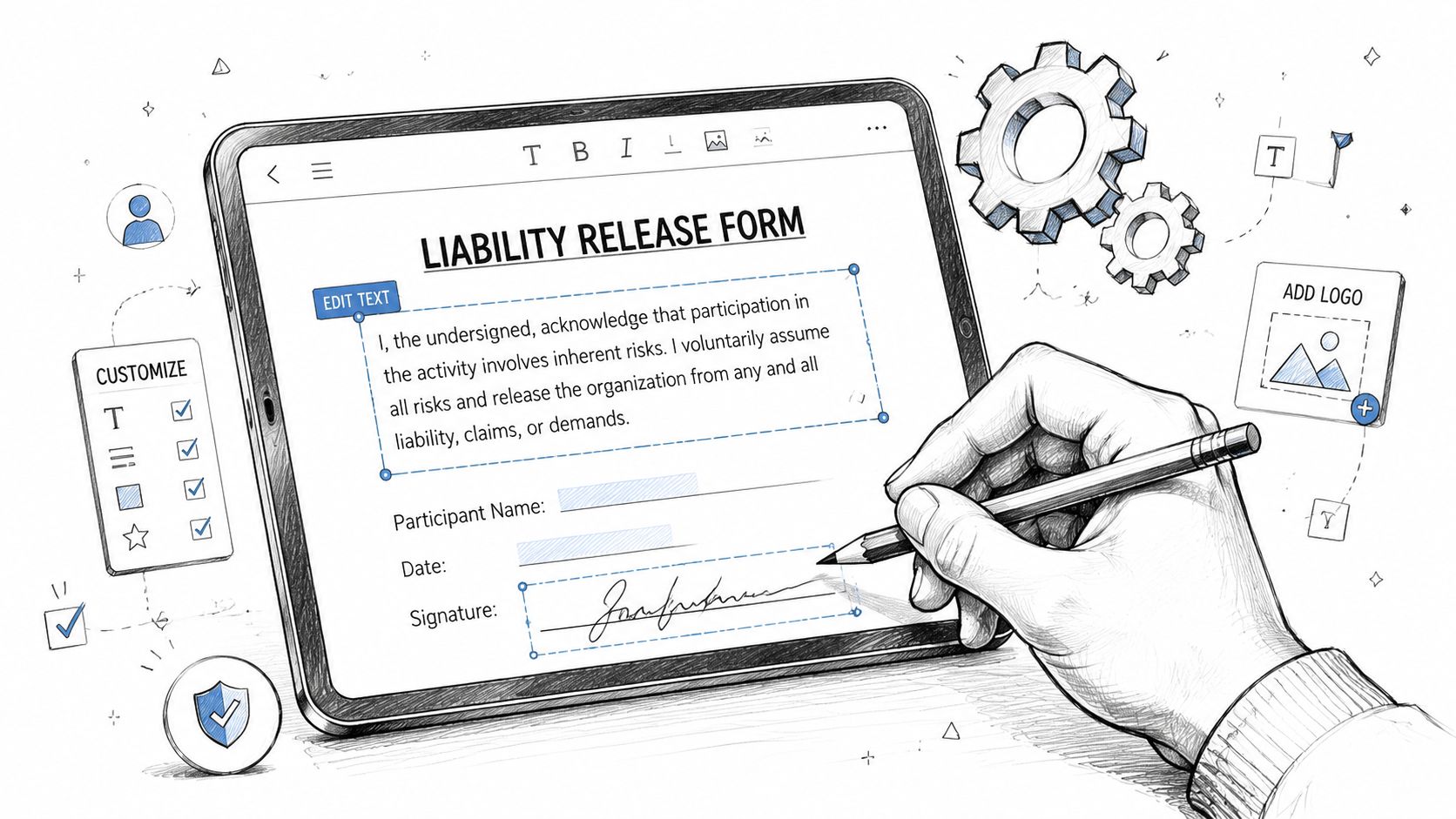
Start with your actual risk, not a generic template
A key drafting challenge is making a waiver enforceable for future or unknown risks. That turns on precise language, a separate assumption-of-risk clause, and compliance with governing law, all of which are often missing from basic templates, as noted in DocuSign's liability waiver template guidance.
Start with a plain list of what could happen in your business. Not everything imaginable. The genuine possibilities.
For example:
- A fitness studio: Overexertion, strain, slips, equipment use, partner drills.
- A photographer's workshop: Uneven terrain, weather exposure, equipment handling, travel between locations.
- A property tour business: Stairs, wet surfaces, limited lighting, vacant structures, restricted areas.
That exercise does two things. First, it tells you what needs to appear in the assumption-of-risk section. Second, it exposes where your operations need better procedures, signage, or staff training.
How to tailor the language without overreaching
A custom waiver should read like it belongs to your business, not like it was copied from a dozen unrelated industries.
Use this drafting process:
- Name the activity clearly: Don't say “services.” Say what the person is doing.
- List the material risks: Focus on hazards that are inherent or reasonably connected to the activity.
- Separate risk acknowledgment from the release: These are related, but they shouldn't be mashed into one vague paragraph.
- Include the right parties: Owners, staff, contractors, volunteers, or landlords if appropriate.
- Add governing law and signature details: Don't leave these for later.
A lot of operators also bundle other policies into the same onboarding flow. That can work, but keep the documents distinct. If you run a fitness business, for instance, a waiver should sit alongside operational policies like attendance and billing. A practical example is this guide to a gym no show policy, which shows how participation rules and liability planning solve different problems and shouldn't be blended into one confusing form.
Generic language feels safer because it sounds broader. In practice, it often creates more ambiguity.
One more point matters here. Don't draft a waiver to compensate for avoidable hazards. A form is for allocating risk, not excusing poor maintenance, bad instruction, or preventable chaos. The stronger your operations, the more credible your waiver becomes.
Secure E-Signature and Storage Workflow
A liability release form doesn't end at the signature line. The workflow after drafting is where many businesses either build a clean record or create future headaches.
A digital process closes common gaps
Paper waivers get lost. Front-desk staff file the wrong version. A participant signs a page with no date. Someone scans a blurry copy that cuts off the signature block. None of that helps when you need a reliable record.
A digital workflow fixes many of those operational gaps if it's set up well. The point isn't novelty. It's consistency.
Good process design usually includes:
- Pre-filled fields: Reduce errors in names, dates, and activity details.
- Signing order when needed: Useful if a parent, guardian, manager, or co-party must sign in sequence.
- Status tracking: You can see whether the waiver was sent, opened, or completed.
- Archived final copies: Store the completed document in a place your team can retrieve quickly.
If you're comparing vendors or evaluating the mechanics behind digital execution, this overview of e-signature technology for business gives helpful context on what to look for in the signing layer itself.
A tool such as SignWith can fit this kind of workflow because it supports uploading documents, placing fields, routing for signature, and retaining completed copies with an audit trail, while following U.S. e-signature compliance requirements under the ESIGN Act and UETA.
What to keep after the document is signed
The signed PDF is only part of the record. Keep the supporting trail too.
That means retaining:
- The completed document: The exact version the signer executed.
- Audit details: Time-stamped actions tied to the signing event.
- Delivery records: Evidence the document was sent to the intended person.
- Organized storage: Folders by event, client, property, or program date.
This short demo shows what a digital signing flow looks like in practice.
The business benefit is practical. When a dispute pops up months later, your team isn't searching inboxes, reconciling paper scans, or guessing whether the signer saw the final language. You have a record that shows the document, the timing, and the completed result.
Frequently Asked Questions About Liability Waivers
Do I still need insurance if I use waivers
Yes. A waiver and insurance do different jobs. A waiver helps manage claims by documenting risk acknowledgment and release terms. Insurance helps handle covered losses, defense, and broader business exposure. Most businesses need both.
Can a parent sign for a minor
Often, a parent or guardian signature is part of the process when minors are involved. Whether that works, and how it should be drafted, depends on governing law and the activity. If your business serves minors regularly, get jurisdiction-specific legal review instead of relying on a generic adult form.
Is a liability waiver the same as an NDA
No. A liability waiver deals with injury, damage, risk, or claims tied to an activity or incident. An NDA deals with confidentiality and the handling of nonpublic information. They solve different legal problems and shouldn't be used as substitutes.
Should a lawyer review my form
If the activity has meaningful physical risk, involves minors, uses contractors, or spans multiple states, yes. That review is especially valuable when you've customized a template and want to know whether the scope, assumptions of risk, and related-party coverage fit your operations.
A lawyer review is also wise if you're using the form to settle an existing dispute rather than screen risk before participation.
The cheaper option is usually to fix the form before a dispute starts, not after one.
If you want a cleaner way to send, sign, and store liability waivers without a subscription workflow, SignWith provides U.S. e-signature compliance under the ESIGN Act and UETA, along with audit-trailed document records that support a more defensible signing process.
