
You send a client contract as a PDF, add “please sign and return,” and move on with your day. A few hours later, the client emails it back with their name typed at the bottom. It looks done.
But is it actually enforceable?
That's where many small businesses, consultants, and freelancers get stuck. The signing process feels simple until there's a dispute over payment, scope, dates, or whether the other person ever agreed at all. At that point, convenience stops mattering. Evidence matters.
Electronic signing is now part of normal business operations, not a side option. Industry summaries estimate the global digital signature market at USD 12.22 billion in 2025, with a projected 39.3% CAGR from 2025 to 2034, reaching USD 238.42 billion by 2034, according to Certinal's 2025 eSignature statistics summary. That tells you something important. Businesses aren't adopting e-signatures just because they're faster. They're adopting them because deals need to move, records need to hold up, and compliance needs to be built in.
If you run a small business, the practical question isn't “Are e-signatures legal?” It's “What exactly do I need to prove if someone challenges this contract later?”
Table of Contents
From Handshake to Clickwrap Why eSignature Rules Matter
A lot of owners still treat signing like an afterthought. They write a proposal, convert it to PDF, and assume any digital mark counts as acceptance. That works fine until a customer says, “I never agreed to those terms,” or “That version wasn't the one I signed.”
The old paper world had friction, but it also had signals people understood. A signed page, a date, a scanned copy, maybe a witness. Digital workflows remove friction, which is good for business, but they can also remove proof if you build them carelessly.
That's why esignature requirements matter. They're not legal trivia. They're the rules that separate a smooth digital agreement from a weak record you can't defend.
Practical rule: If your process can't answer who signed, what they signed, when they signed, and whether the document changed afterward, your process is too thin.
For a freelancer, this might affect whether you can collect a late invoice. For an HR manager, it might affect whether an employee acknowledgment holds up. For a consultant, it might affect whether the client accepted the statement of work you relied on.
Three common situations create confusion fast:
Typed name in an email: A client replies “Agreed, John Smith,” but the attached contract isn't referenced clearly.
Shared inbox signing: Someone at the company signs from a general admin email, and nobody can later prove which person approved it.
Updated file problem: You send Version A, someone signs, and a different file gets saved in your folder without a clear audit trail.
None of those are unusual. All of them create avoidable risk.
Business owners usually don't need a law degree to fix this. They need a signing process designed around evidence, not just speed. Once you look at e-signatures that way, the rules become much more straightforward. The law is asking for proof of intent, consent, identity, document integrity, and access to the final record. That's manageable if you know what to look for.
Understanding US eSignature Laws ESIGN and UETA
In the United States, ESIGN and UETA are the basic rules of the road for electronic contracting. They exist so businesses can rely on digital records and signatures instead of insisting on paper for ordinary transactions.
In plain English, the core idea is simple. An electronic signature can carry the same legal weight as a handwritten signature if the surrounding process supports it. The law isn't focused on whether the mark looks like cursive. It's focused on whether the person intended to sign, agreed to use electronic records, can be tied to the signing act, and whether the record can be kept and reproduced accurately.
What these laws mean in real life
A lot of people think an e-signature is just a signature image pasted into a PDF. That's too narrow.
Under U.S. legal standards, the stronger question is whether your workflow proves the right things. Adobe's legal summary explains that the essential requirement for an enforceable e-signature is intent, consent, attribution, and record retention, and it also notes that ESIGN validates electronic records if they accurately reflect the agreement and can be reproduced when required. The same summary highlights a California case where a digital signature failed because the employer couldn't provide enough evidence that the employee signed it. You can review that discussion in Adobe's U.S. e-signature law overview.
That last point matters more than most small businesses realize. Courts don't reject electronic signatures because they're electronic. They reject weak evidence.
The four ideas you should remember
If you only keep four legal ideas in your head, keep these:
Intent: The signer must take an action that clearly shows they mean to sign.
Consent: The parties must agree to handle the transaction electronically.
Attribution: You need a reasonable way to connect the signing event to the actual person.
Retention: The final signed record must remain accessible and reproducible later.
A typed name can be part of a valid e-signature process. A typed name by itself, with no surrounding evidence, is where problems start.
That's why many informal workflows fall short. They capture the symbol but miss the proof. A person typing their name at the bottom of a Word document isn't the same thing as a system recording their review, acceptance, timestamp, and final executed copy.
What this means for you
If you're a small business owner, don't ask whether a platform lets people “sign online.” Ask whether it helps you prove the transaction.
Use that lens on every workflow:
Client contracts: Can you show the client saw the final terms before signing?
NDA approvals: Can you reproduce the exact signed version later?
HR forms: Can you connect the signer to their own action, not a shared login?
Vendor agreements: Can you demonstrate that everyone consented to do this electronically?
The law is workable. The burden is operational. You need a process that creates evidence as the agreement happens.
The Anatomy of a Legally Binding eSignature
Most legal confusion disappears once you break the process into parts. A legally binding e-signature isn't one thing. It's a chain of proof.
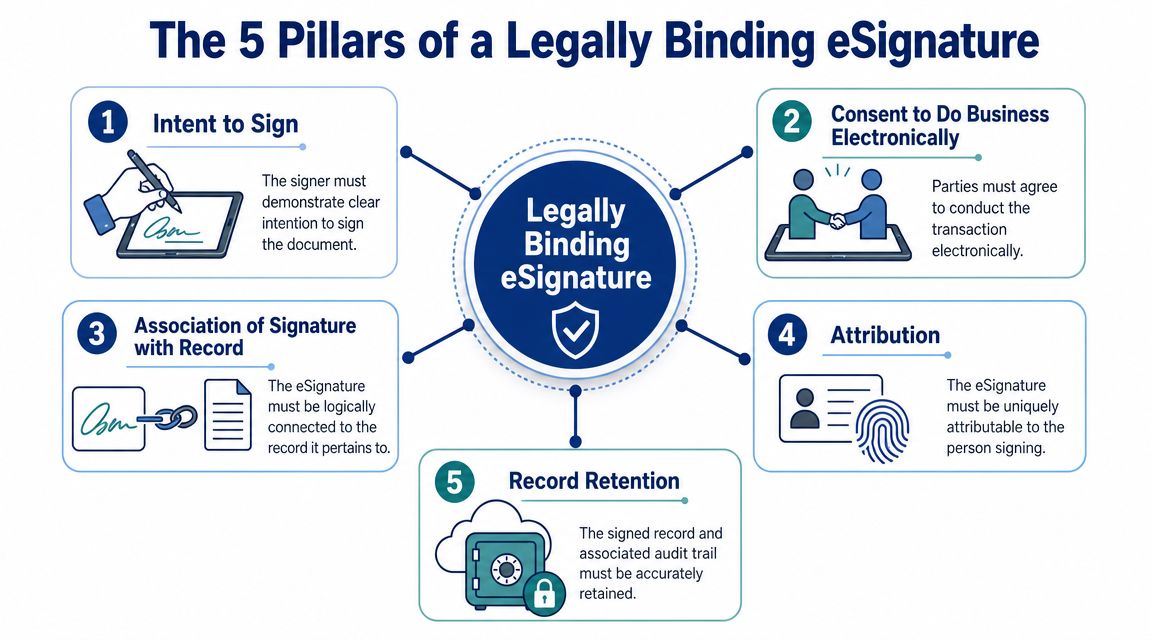
Intent comes first
Intent to sign means the signer takes a deliberate action that shows acceptance. That could be clicking a clearly labeled sign button, applying a signature in a designated field, or completing a structured signing flow.
What weakens intent is ambiguity. If someone receives a document by email and casually replies “looks fine,” that may not clearly show they intended that message to operate as a signature on that specific record.
One sentence example: A client clicks a button labeled “Sign Agreement” after reviewing the contract on-screen.
Consent to do business electronically is separate. This distinction often confuses readers. A person can intend to sign but still never clearly agree to conduct the transaction electronically.
That's why good workflows include a consent step before or during signing. It doesn't need to be dramatic. It needs to be clear.
Why it matters: Without consent, your process may be challenged even if the person interacted with the document.
What to look for: A visible disclosure and an affirmative action showing agreement to electronic records.
Simple example: Before signing, the user checks a box confirming they agree to receive and sign documents electronically.
Consent and attribution do different jobs
Association of the signature with the record means the signature has to be logically tied to the document itself. In other words, the signed act should point to that exact agreement, not just some unrelated electronic action.
This is one reason dedicated signature workflows are stronger than loose email chains. If you want a plain-English breakdown of the terminology, this guide on digital signature vs electronic signature is useful for separating the technology terms from the legal function.
Attribution answers the question, “How do you know it was really that person?” For many businesses, this is the most practical part of compliance.
Attribution can come from a combination of factors:
Email control: The signer accessed the document through their own email invitation.
Authentication detail: The system records login details, timestamp, and related event data.
Individual workflow: Each signer gets a unique path rather than a shared account or generic company inbox.
One sentence example: The contract is sent to the client's named email address, and the system records their signing event in a unique audit trail.
If two employees share one login and one person signs, you may have a business record, but you may not have strong attribution.
Integrity and retention are what save you later
The final two pillars matter most when there's a dispute.
Record integrity and audit trail mean the system preserves evidence that the document was valid when signed, that changes after signing can be detected, and that the process captured the signer's review and execution steps. The EPA's CROMERR requirements describe this operational baseline for defensible systems, including proving validity at signing, preventing unnoticed alteration, and retaining evidence that the signer reviewed the content before signing. That's why EPA guidance on e-signature system requirements emphasizes immutable audit trails and integrity protections.
Think of the audit trail as your silent witness. If a disagreement comes up months later, it can show the sequence of events instead of leaving you to rely on memory.
Record retention and access mean the final signed agreement must be stored accurately and be reproducible later. This sounds boring until you need it. A contract you can't find, can't open, or can't prove is final won't help much in a conflict.
A practical retention standard usually includes:
Executed copy delivery: All parties receive the completed version.
Archived storage: The signed file and supporting trail are preserved.
Reliable retrieval: You can produce the agreement later without guessing which version is final.
One sentence example: After signing, both parties automatically receive the completed file, and the sender can download the same final copy with its event history later.
When you line up these five pillars, esignature requirements stop feeling abstract. They become a checklist for building a signing process you can trust.
Your Practical eSignature Compliance Checklist
Most businesses don't need a legal memo. They need a quick way to pressure-test their current process.
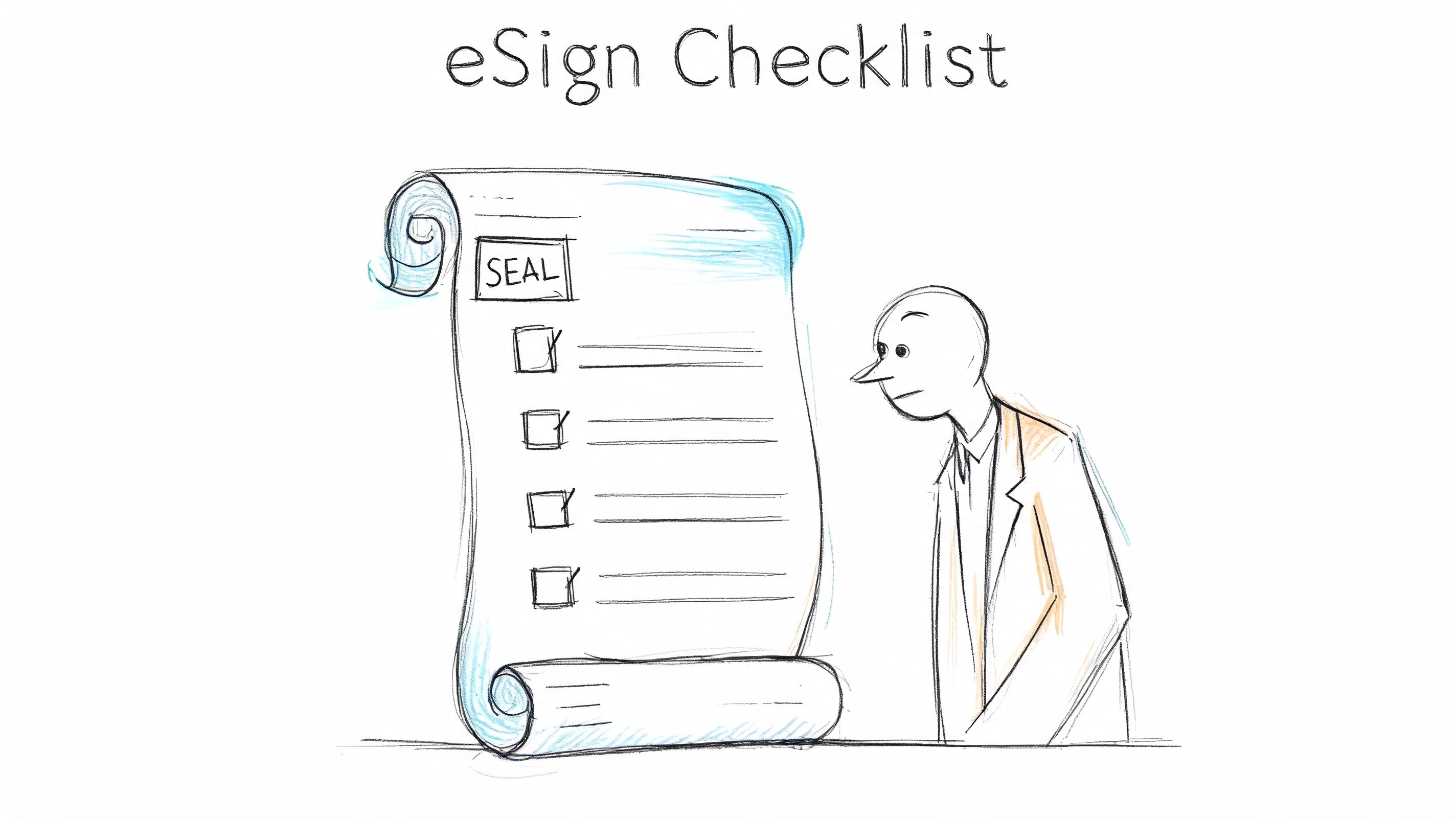
If you currently send PDFs by email, collect approvals through inbox replies, or use a mix of tools depending on the client, use this section as a self-audit. If several answers are “not sure,” that's your signal that the workflow needs tightening.
A simple self-audit
Before the table, one practical distinction helps. Convenience features are not the same as compliance features. A tool that lets someone draw a signature is useful. A tool that captures intent, signer activity, completed records, and a defensible history is what reduces risk. If you need a simple overview of the actual sending process, this walkthrough on how to sign a contract electronically gives the mechanical side.
| Requirement | What to Check | Pass/Fail |
|---|---|---|
| Intent to sign | Does the signer take a clear action that shows they mean to sign this document? | |
| Electronic consent | Do you clearly ask the signer to agree to electronic records and signatures? | |
| Signer attribution | Can you show who signed, not just which email received the document? | |
| Signature-to-record connection | Is the signature tied to the exact version of the agreement? | |
| Tamper evidence | Can you detect if the document changed after signing? | |
| Audit trail | Do you keep a time-stamped record of sending, viewing, and signing events? | |
| Executed copy delivery | Does every party receive the completed signed copy? | |
| Record retention | Can you retrieve the final agreement later in a readable form? | |
| Access control | Are you avoiding shared credentials or delegated signing without proof? | |
| Accessibility | Can signers complete the process if they can't draw a signature or use a standard interface? |
A strong process should let you answer “yes” to all of those without manual detective work.
Accessibility belongs on the checklist
Accessibility often gets skipped because teams think of it as a design issue, not a compliance issue. That's a mistake.
Techplayon notes that many international laws require accessible electronic signing processes and warns that failure to provide one can create discrimination risk. It also explains that PIN or password-based signing can still be legally binding and accessible when identity and intent are supported by other credentials such as date and time, IP address, and login details, as covered in Techplayon's accessibility discussion for e-signature platforms.
That matters if your signer:
Uses assistive technology
Can't draw a handwritten-style signature
Can't use a mouse or touchscreen
Needs a keyboard-friendly path
A compliant workflow should offer alternate signing methods where needed, while still preserving identity and evidence.
Here's a quick visual explainer before you review your own process in detail:
The safest checklist question isn't “Can people sign?” It's “Can the right person sign clearly, accessibly, and in a way we can prove later?”
Common eSignature Mistakes That Invalidate Contracts
The biggest e-signature mistakes usually come from trying to save a few minutes.
A consultant sends a contract by email. The client replies, “I agree.” Months later, a payment dispute starts. The consultant produces the email chain, but the attachment history is messy, the final version isn't obvious, and there's no record showing the signer reviewed the exact terms at issue. What looked efficient now looks uncertain.
The shortcuts that create problems
Here are the patterns that create the most trouble.
Using a typed name with no surrounding proof: A typed signature can work, but only when the process also captures intent, attribution, and the record tied to that action.
Skipping electronic consent: If nobody explicitly agreed to transact electronically, you've left a gap in the process.
Letting teams use shared inboxes or shared credentials: That makes attribution harder when one person later denies signing.
Saving signed files manually under inconsistent names: This creates version confusion and weakens retention.
Failing to preserve a clear audit history: If the signer challenges the contract, you need more than a final PDF.
One preventive measure fixes most of these. Use a structured workflow that records the path to signature, not just the mark itself.
Why these mistakes show up more now
Many businesses adopted digital signing because customers expect it. That expectation is real. In one industry summary, 56% of respondents said customer expectation for digital interaction was the main driver of adoption, while 46% pointed to increased awareness of e-signature legality, according to forms.app's e-signature statistics overview.
That creates pressure to move fast. But speed can push teams into informal habits that aren't strong enough when a disagreement appears.
A fast signing process is good. A fast process that leaves you unable to prove the agreement is just a faster way to create risk.
A better habit is to review every shortcut with one question: if this signer denied the contract six months from now, what evidence would we have? If the answer is “mostly email,” tighten the workflow before the next important agreement goes out.
Meeting Requirements Seamlessly with SignWith
The hard part of e-signature compliance isn't memorizing legal terminology. It's making sure every document follows a defensible process without forcing you to manage the details by hand.
That's where a dedicated workflow helps. Rather than relying on PDFs, inbox threads, and manual file storage, you use one system to upload documents, place fields, assign signers, route signature order, track status, and preserve the completed record.
Here's what that solves in practical terms:
Problem: You can't easily prove who signed.
Solution: A signing platform can create a signer-specific event history and preserve supporting details around the transaction.Problem: Signed files get edited, renamed, or mixed up with draft versions.
Solution: A controlled workflow preserves the executed copy and ties the signature to that record.Problem: You forget to send final copies or archive them consistently.
Solution: Automated delivery and storage reduce manual gaps.Problem: Occasional signing needs don't justify a heavy subscription.
Solution: A pay-per-document model fits freelancers, consultants, and small teams better than a bloated seat-based setup.
Here's the complete demo for SignWith:
For U.S. businesses focused on ESIGN Act and UETA alignment, SignWith is one option built around that practical need. It supports document upload, field placement, signer routing, downloadable completed copies, and detailed audit trails, and it's designed for businesses that want occasional or variable-volume signing without committing to a subscription. If you want to test the workflow before adopting a broader process, the free eSignature tool from SignWith is a straightforward starting point.
The main point isn't that software replaces judgment. It's that the right workflow handles the repetitive compliance work consistently. You still decide when a contract should be signed, who should sign, and what terms matter. The system handles the evidence trail that helps those decisions hold up later.
If you want a simpler way to send contracts, capture signatures, and keep a defensible audit trail without paying for a monthly subscription, take a look at SignWith. It's built for businesses that need ESIGN Act and UETA-aligned e-signatures with a straightforward pay-per-document model.
