
An NDA usually arrives at the worst possible moment. You're excited about a new client, a partnership call went well, or a prospect is finally ready to share details, and then a PDF lands in your inbox with a polite note asking you to sign before moving forward.
That pause you feel is healthy. If you sign an NDA regularly, you learn two things fast. First, most of them are routine. Second, some of them do more than protect confidential information.
The safest approach is simple. Treat the NDA like an operational document, not a ceremonial one. Check whether it's still timely, whether you're the right person to sign it, whether the scope is tied to the work, and whether the fine print slips in restrictions that have nothing to do with confidentiality. If you want a quick primer on how confidentiality agreements work, that overview is useful background before you evaluate the document in front of you.

Table of Contents
- You Just Received an NDA. Now What?
- How to Review an NDA Without a Law Degree
- Smart Ways to Push Back on Unfair Terms
- The Modern Way to Finalize Your Agreement
- A Step-by-Step Guide to Secure E-Signing
- Your NDA Is Signed. What Happens Next?
You Just Received an NDA. Now What?
The first thing to do is slow down. Don't assume the sender is being difficult. In normal business operations, NDAs are still a standard tool for protecting trade secrets and confidential information. Thomson Reuters notes that an NDA becomes legally binding once it's properly drafted and executed, which is why this isn't a formality you should breeze through at the end of a busy day (Thomson Reuters on NDA enforceability and recent policy limits).
That said, not every NDA should be signed immediately. Sometimes the information was already shared on a sales call. Sometimes the sender addressed the agreement to you personally when your company should be the party. Sometimes the person being asked to sign doesn't have authority to bind the business. Those are practical issues, not lawyer-only issues.
The first decision is timing
An NDA works best when it comes before the confidential discussion, not after. If someone already sent the sensitive deck, access credentials, or customer list, the agreement may still help for future disclosures, but it may not cleanly protect what has already been revealed.
Practical rule: If the confidential information is already out, stop pretending the paperwork will fully rewind the situation. Review what was disclosed, then decide whether the NDA still protects future exchanges.
The second decision is authority
A lot of signing mistakes happen because the wrong person signs. If you're a freelancer, consultant, or ops lead inside a small company, check whether the document names you as an individual or your business entity. If the wrong party signs, you create unnecessary exposure and confusion later.
When people ask me how to sign an NDA safely, I don't start with the signature block. I start with three blunt questions:
- Was anything sensitive already shared? If yes, treat this as a partial fix, not perfect protection.
- Am I the right signer? Make sure the named party matches the actual business relationship.
- Is this only about confidentiality? If it starts drifting into competition, hiring, or ownership restrictions, pause.
That triage takes minutes. It can save you from months of avoidable friction.
How to Review an NDA Without a Law Degree
You don't need to decode every line. You need to find the parts that control real risk. Most weak reviews fail because people either skim too fast or get lost in dense wording and miss the clauses that matter.
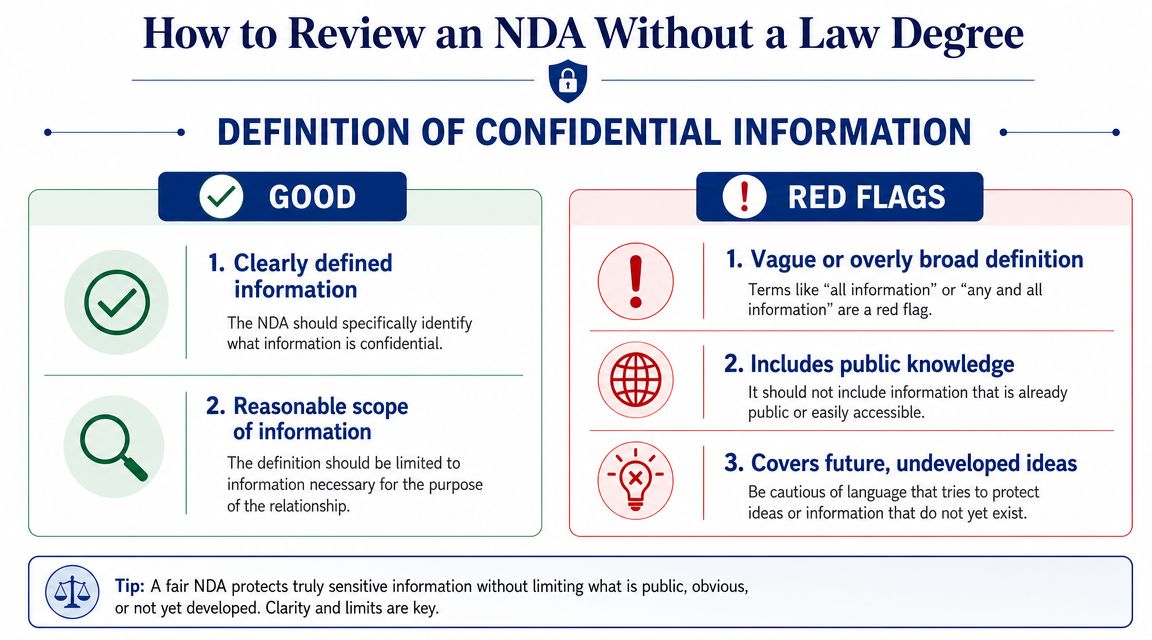
Start with the four clauses that matter
A practical workflow is to lock down the relationship between the parties, the scope of confidential information, the governing law, and the term of confidentiality before sending anything, and one expert guide recommends signing before any sensitive information is shared because sending the data first weakens the protection you're trying to establish (practical NDA workflow guidance).
Use that as your triage list.
| Clause | What you want | What should worry you |
|---|---|---|
| Parties | Correct legal names and clear roles | You personally listed when your company should sign |
| Confidential information | Specific categories tied to the project | Anything you learn, everything shared, vague catch-all language |
| Purpose and use | Limited to evaluating or performing the stated deal | Open-ended rights or use beyond the transaction |
| Term | A defined confidentiality period | No end date, confusing survival language, very long term without reason |
Read for red flags, not legal poetry
The best NDAs are boring. They identify the parties, define what's confidential, limit use to a specific purpose, and include carve-outs. Docusign's guidance emphasizes a narrow, purpose-based scope with explicit carve-outs for public-domain information and legally compelled disclosure, and warns that over-broad drafting can create enforceability problems and make the document less practical (purpose-based NDA drafting guidance).
Here's the review method I use.
- Check the definition first. If “confidential information” includes public material, general know-how, or your future undeveloped ideas, the scope is too loose.
- Look for carve-outs. Public information and legally compelled disclosure shouldn't be treated the same as a protected trade secret.
- Find the purpose sentence. If the agreement doesn't tie use to a transaction, evaluation, or project, it's often broader than it needs to be.
- Scan for extras. If an NDA starts behaving like a services contract, employment agreement, or IP assignment, it's no longer a simple NDA review.
An NDA should protect information. It shouldn't quietly claim control over your pipeline, your staff, or your future work.
One more practical point gets missed all the time. Ask yourself whether the document is too late. Some legal guidance notes that an NDA can't force secrecy for information already known, and if confidential details were disclosed before signing, the agreement can be ineffective for that specific information. The same guidance also notes that minors, intoxicated individuals, and people with compromised mental faculties cannot validly sign, and that businesses shouldn't rely on NDAs for information that is already public or too vague to enforce (who cannot sign and when an NDA is too late).
That's why pre-signing review matters so much. You are not only reading the document. You are checking whether the document still matches reality.
Smart Ways to Push Back on Unfair Terms
A bad NDA isn't a reason to panic. It's a reason to edit.
Most overreaching NDA terms show up because someone reused an old template or stuffed several legal goals into one form. The fastest way to handle that is to separate legitimate confidentiality protection from everything else.
What deserves pushback
Modern NDAs often hide operational restrictions inside language that looks standard at first glance. Practical guidance warns against unlimited liability, recommends realistic liquidated damages, and flags clauses that block competition, employee solicitation, or IP assignment as inappropriate in many NDAs. The same guidance notes that NDAs are routinely challenged when they're too broad or interfere with people's ability to work (hidden NDA risks and overreach).
If you see any of these, push back:
- Non-solicit language that stops you from hiring or working with people far beyond the project.
- Non-compete style restrictions that limit who you can serve next.
- IP assignment language inside a confidentiality document.
- Unlimited liability for any breach, no matter how minor or indirect.
- Venue clauses that force disputes into an inconvenient location for no obvious reason.
Phrases that keep the deal moving
The tone matters. Don't argue like you're drafting a court brief. Sound like someone trying to keep the project clean and workable.
Try language like this:
“I'm comfortable with confidentiality obligations. I'd like to narrow the definition of confidential information so it's tied to this project and excludes public or independently developed information.”
Or this:
“My understanding is that this document is meant to cover confidentiality. Could we remove the non-solicit language and keep the agreement focused on that purpose?”
And if the term feels too long, say it directly but calmly. You don't need to lecture anyone.
- For a long term: “Could we use a shorter confidentiality period that better matches this engagement?”
- For broad liability: “I'm not able to accept open-ended liability under an NDA. Can we revise that to a more reasonable standard?”
- For IP language: “If intellectual property needs to be addressed, I'd prefer that in the main services agreement rather than inside the NDA.”
Professionals negotiate NDAs all the time. Clean pushback usually signals that you read the document carefully. That builds trust faster than silent resentment followed by problems later.
The Modern Way to Finalize Your Agreement
Once the terms are settled, the goal is simple. Get the final version signed cleanly, keep the record intact, and avoid version chaos.
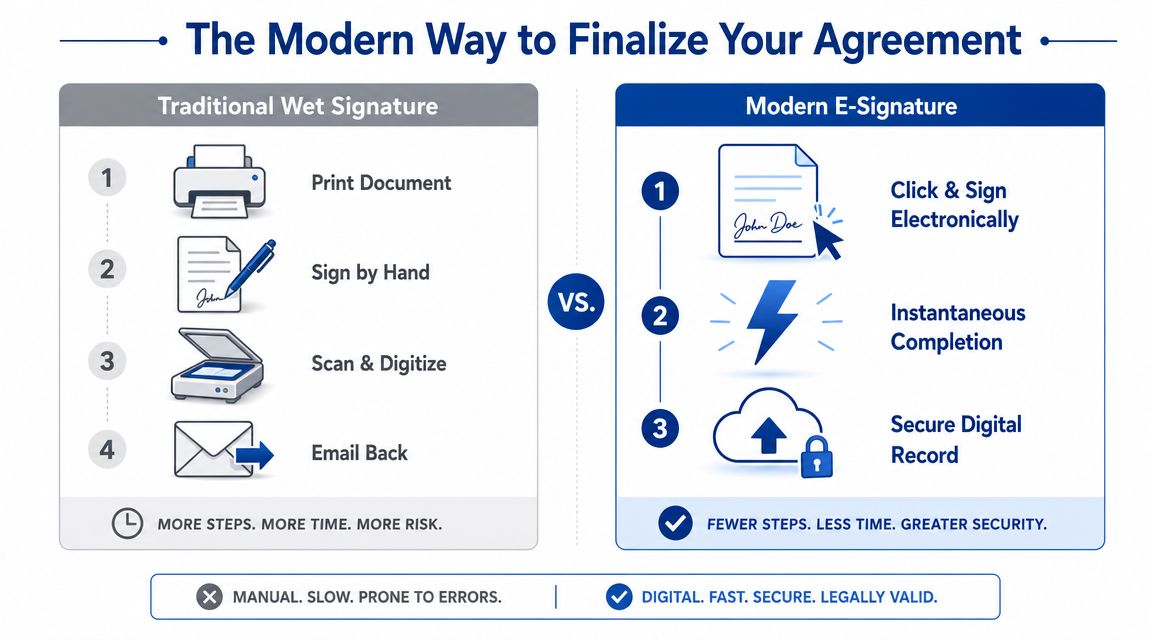
Paper workflow versus e-signature workflow
The old print-sign-scan routine still exists, but it creates avoidable mess.
| Traditional method | E-signature method |
|---|---|
| Print the file | Open the final document link |
| Sign by hand | Apply signature electronically |
| Scan or photograph it | Complete in the same workflow |
| Email attachments back and forth | Everyone receives the executed copy |
| Risk duplicate versions | Cleaner recordkeeping |
For most business use, electronic signing is the practical default. In the United States, the ESIGN Act and UETA give electronic signatures legal force, so the issue usually isn't whether you can e-sign. The issue is whether you're using a tool and process that preserve the final version and the signing record.
What to use when it is time to sign
If you handle contracts regularly, it's worth understanding the broader ecosystem around digital paperwork, including AI-powered contract tools that help with drafting, review, and workflow support before the signature step.
For the signing step itself, use a platform built for compliant e-signatures and clear document handling. For example, Adobe Sign alternatives are worth comparing if you want a simpler workflow for occasional documents. SignWith is one option that supports electronic signatures with ESIGN Act and UETA compliance, document sending, and audit-trailed records.
That's the true upgrade. Not novelty. Cleaner execution.
A Step-by-Step Guide to Secure E-Signing
The safest signing flow is boring, repeatable, and easy to audit later. That's what you want when you sign an NDA.
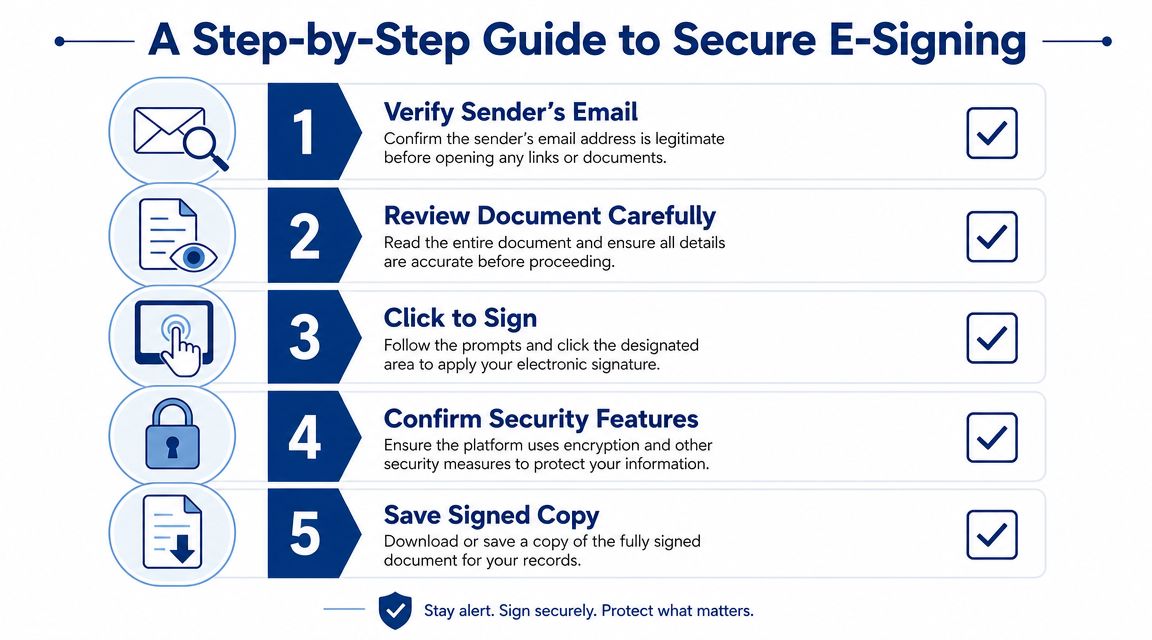
Before you click anything
Start with the email, not the signature button.
- Verify the sender. Check that the email came from the person or company you expect. If anything feels off, confirm through a separate message thread.
- Match the document to the negotiation. Open the file and confirm it's the final version you agreed to.
- Check the named parties. Make sure the signer and business entity are correct before you complete anything.
A lot of avoidable errors happen because people assume the version in the e-sign link is the same one discussed over email. Sometimes it is. Sometimes someone uploaded an earlier draft with a clause you already negotiated out.
If the attached agreement and the signing copy don't match, stop the process and ask for the corrected version. Small mismatches become big problems once the file is executed.
The signing flow that avoids mistakes
Once the document is confirmed, the actual e-signing process is usually straightforward.
- Open the secure signing request from the verified sender.
- Scroll through the whole document even if the platform jumps you to the signature field.
- Apply your signature by typing or drawing, depending on the platform.
- Confirm the final submission only after checking every required field.
- Download the completed copy immediately after execution.
This short video shows the general flow in practice:
Security matters here, but not in a mystical way. You want a platform that gives you a clear final copy, tracks completion, and keeps an accessible record. If you need a broader walkthrough of the process, this guide on how to eSign a document is a practical companion.
One more operational rule matters before any button gets clicked. Sign before the sensitive information starts moving. As noted earlier in the workflow guidance, the protection is stronger when the NDA is in place before disclosure. Once the information has already been exchanged, you're documenting a relationship after the fact instead of controlling it at the start.
Your NDA Is Signed. What Happens Next?
You sign at 4:47 p.m., file the PDF, and get back to work. Two months later, the client sends over a broader brief, loops in a subcontractor, and references “the NDA on file” as if it covers everything. That is usually when people realize the essential work starts after signature, not before.
A signed NDA creates an operating rule, not just a document to archive. It affects what you can share, who can see the material, how your team stores it, and whether a future dispute turns into a clean records issue or a messy memory contest.
What changes the moment you sign
Your obligation starts once the NDA is executed, but that does not mean every sentence in it will hold up in every situation. Some confidentiality clauses are limited by law, especially where an agreement tries to silence protected reporting or block rights that cannot be signed away. That matters because people often treat a signed NDA like a total gag order when it is really a narrower contract with boundaries.
The practical takeaway is simple. Follow the confidentiality duties that are in the agreement, and do not assume the other side can stretch them far beyond the deal you made.
The first post-signing step is recordkeeping. Save the final PDF in a place you will still check six months from now. If the platform produced an audit trail, completion certificate, or signer log, save that with the agreement. I prefer a folder structure by client, then project, then effective date, because disputes rarely show up when your inbox is tidy and recent.
The hidden risk after signature
This is also the point where the quieter risks start to matter.
A modern NDA can affect more than secret information. It may restrict how you use residual knowledge, bar contact with certain customers, require pre-approval before naming the client in a portfolio, or force all disputes into a forum that is expensive for a solo consultant or small team. None of those issues feel dramatic on signing day. They become expensive once the relationship changes shape.
That is why I treat the signed copy as an operating document. If the scope expands, if new people join the project, or if the client starts sharing information outside the original purpose clause, pull the NDA back up and check whether the current workflow still fits the paper.
How long your obligation usually lasts
Many NDAs run for a defined term, but the definitive answer lies in the language, not the title. Some confidentiality duties end on a calendar date. Others run for a set period after the last disclosure. Some carve out trade secrets and keep those obligations alive longer under applicable law.
You do not need a legal memo to manage that well. You need to note the trigger that controls the clock.
Use a short post-signing checklist:
- Store the executed copy and any audit record together
- Note the effective date and the clause that sets the confidentiality term
- Track who on your side can access the confidential material
- Keep disclosures tied to the stated purpose in the agreement
- Recheck the NDA if the project scope, team, or deliverables change
- Calendar deletion or return obligations if the contract requires them
If you want a practical reference for storing, tracking, and completing the file cleanly, this guide to an e-signed NDA workflow is a useful companion.
If you need to sign or send an NDA without adding another subscription to your stack, SignWith gives you a straightforward e-signature workflow with ESIGN Act and UETA compliance, audit trails, and downloadable signed copies. That is usually enough for freelancers, consultants, and small teams.
