
You send the contract. The client is ready. The work starts as soon as one signature lands in your inbox.
Then the doubt shows up.
Is a typed name enough? Does clicking a button count? If the client signs on a phone, will that hold up later if payment becomes a fight or the terms get challenged?
That's where most small business owners get stuck. They've heard that electronic signatures are legal, and that part is broadly true. But a legal document signature isn't just about getting a mark on a page. It's about being able to show who signed, what they signed, when they signed it, and whether they meant to agree.
That distinction matters more than most articles admit. A signature can look fine and still be weak evidence. A simple digital workflow can also be stronger than ink on paper if it captures the right records.
Table of Contents
The Modern Handshake That Seals the Deal
A freelancer closes a new client. The proposal is approved, the scope is settled, and the start date is near. The client is in another state, traveling, and wants to sign from a phone before boarding a flight. That used to create friction. Print, sign, scan, resend, hope the pages are legible, then file the PDF somewhere no one will lose it.
Today, that same moment usually happens digitally. The contract arrives by email, the signer reviews it on a laptop or phone, clicks through the signing steps, and both sides receive a completed copy within minutes.
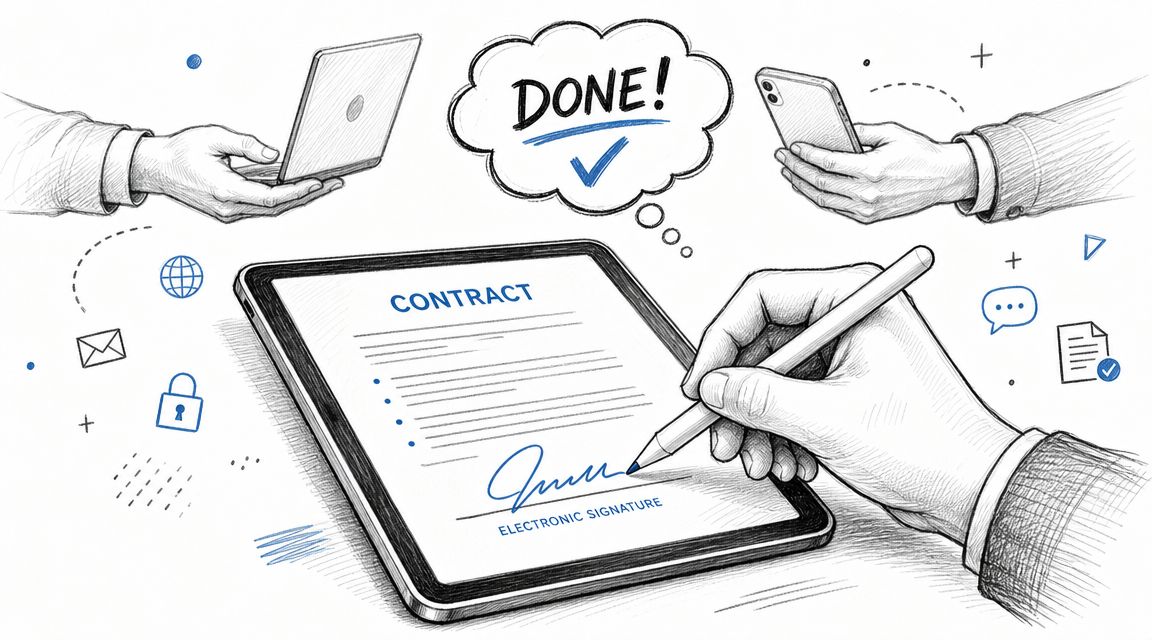
That shift isn't just a convenience trend. It rests on a legal foundation. Electronic signatures have moved from a niche convenience to a mainstream legal tool, and platforms have served over a billion users worldwide, as noted in DocuSign's overview of e-signature legality. The same source explains that the ESIGN Act and UETA established that an electronic mark can satisfy signature requirements when intent and consent are properly captured.
For a small business owner, that changes the question. It's no longer, “Can I use digital signing at all?” It's, “Am I using a process that creates evidence?”
A handwritten signature often feels more serious because it looks familiar. But familiarity and defensibility aren't the same thing. If a signer later claims, “That isn't my agreement,” a messy pen stroke on a scanned PDF may leave you with very little to work with. A well-run electronic signing process can leave a much clearer record.
Practical rule: A legal document signature should do two jobs at once. It should capture agreement, and it should preserve proof.
That's why the safest way to think about signatures today is not as a drawing, but as a documented act of acceptance. The visible mark matters less than the surrounding record.
What Actually Makes a Signature Legally Binding
People often assume a signature is the name itself. In practice, the law pays more attention to the circumstances around it.
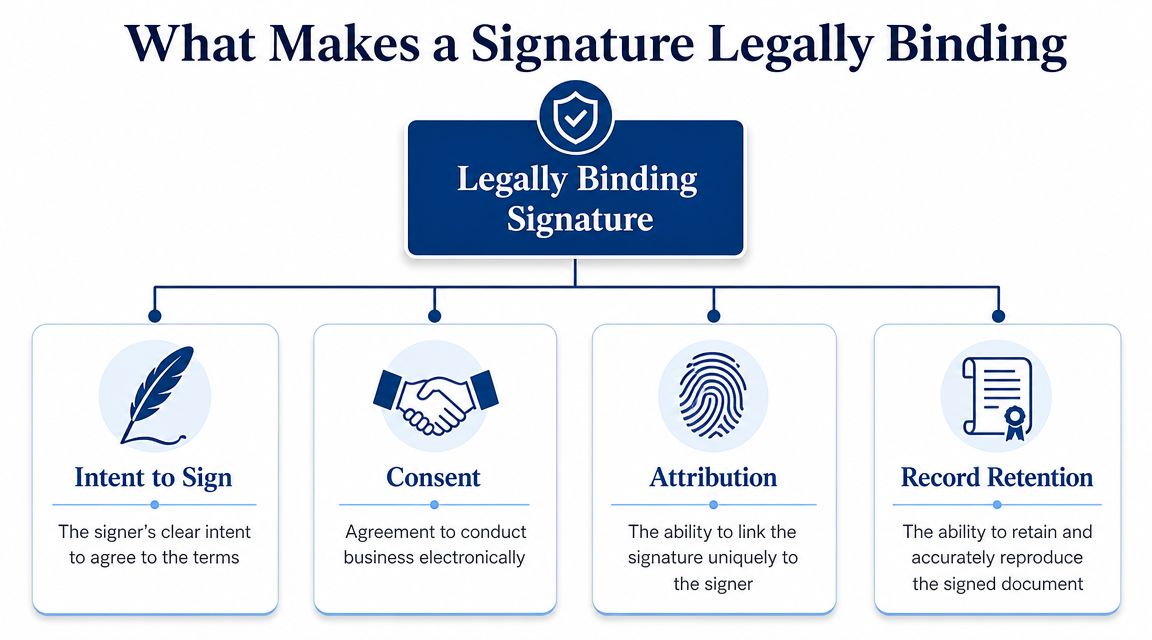
A typed name can be valid. A click can be valid. A finger-drawn signature on a phone can be valid. What matters is whether the process shows that the signer intended to sign, agreed to use an electronic method, and can be reliably tied to the document.
The law cares about action more than appearance
Under the ESIGN Act, a legal electronic signature is any electronic sound, symbol, or process executed with the intent to sign, as explained by Purdue Global Law School's summary of e-signature requirements. The same explanation emphasizes that enforceability turns on intent, consent, and a reliable connection between the signer and the document through an audit trail.
That's the digital handshake idea. You're not proving that someone made a particular shape with a mouse or stylus. You're proving that the person took a deliberate action to accept the record.
The four pieces you should look for
The infographic above lists four useful checkpoints. Here's what they mean in plain English.
Intent to sign
The signer must mean to accept the document. A clear signing button, a designated signature field, and language that signals agreement all help show intent. If someone clicks through a page without understanding that the action counts as a signature, you've created risk.Consent
If the transaction is electronic, the signer should knowingly agree to handle it electronically. It is at this point that many DIY processes get sloppy. Sending a PDF by email and asking for “just type your name” may work in some situations, but it's stronger when the workflow explicitly captures that the person agrees to sign electronically.Attribution
You need a reliable way to connect the signature event to the signer. Email access alone may not answer every future challenge, but the stronger your attribution records are, the stronger your position becomes. Identity steps, sign-in events, and logged actions help here.Record retention
A signed agreement isn't much help if you can't reproduce it later. You need the final version, and you need confidence that it's the same record the signer saw when they agreed.
A strong signature process answers four simple questions: Who acted, what did they sign, when did they sign, and can you reproduce the same record later?
A lot of confusion comes from mixing up “easy to sign” with “easy to defend.” Good systems should do both. They should keep the experience simple for the signer while unobtrusively building the evidence you may need later.
The Legal Bedrock in the USA ESIGN and UETA
If you run a business in the United States, two names matter more than any others in this area: ESIGN and UETA.
They aren't just legal jargon. They're the rules that let commerce move without requiring paper for every agreement, disclosure, acknowledgment, and approval.
What ESIGN does
The Electronic Signatures in Global and National Commerce Act, usually called the ESIGN Act, is the federal framework. Its core role is straightforward. It gives legal recognition to electronic signatures and electronic records in transactions where they're used properly.
That matters because it puts electronic methods on the same legal playing field as paper methods. A contract doesn't lose force just because the acceptance happened electronically.
What UETA does
UETA, short for the Uniform Electronic Transactions Act, works at the state level. It provides a similar framework for recognizing electronic records and signatures in transactions.
For business owners, the practical takeaway is simple: U.S. electronic signing isn't built on a loophole or a temporary workaround. It's built on established legal standards that support digital transactions when the process captures the right elements.
Why this matters in day-to-day business
These rules affect ordinary business documents more than dramatic courtroom fights. Think about the paperwork you handle all year:
Client contracts for services, retainers, or project work
NDAs before proposals or sales calls
HR forms such as offer acknowledgments or policy receipt confirmations
Operational approvals for vendors, change orders, and internal sign-offs
Without ESIGN and UETA, every remote signature would create friction. With them, a compliant workflow can support ordinary commercial activity in a way that matches how people work.
For a platform choice, this is the baseline. If you're comparing options, the first question isn't about templates or branding. It's whether the workflow is built around ESIGN Act and UETA compliance, clear consent, and a record you can retrieve later.
If your signing process can't show intent, consent, attribution, and a preserved record, it may feel modern but still leave you exposed.
That's why compliance isn't a feature add-on. It's the underlying structure that makes a legal document signature workable for real business.
Wet Signatures vs Electronic Signatures
Paper signatures still have a place. Some people trust them because they're familiar, and in certain situations a physical signature may still be the right route. But for routine business agreements, many organizations are choosing between two different operating models, not just two different signature styles.
A side-by-side comparison
| Attribute | Wet Signature | Electronic Signature |
|---|---|---|
| Speed | Usually slower because documents must be printed, mailed, scanned, or physically exchanged | Usually faster because documents can be sent, signed, and returned remotely |
| Convenience | Requires access to paper, printer, scanner, or in-person handling | Can often be completed on a phone, tablet, or computer |
| Auditability | Often limited to the signed page and surrounding emails | Can include event logs, timestamps, and document history |
| Storage | Physical filing or scanned copies | Digital archiving and retrieval |
| Dispute readiness | May rely on witness memory, email context, or handwriting comparison | Often stronger when the platform preserves detailed evidence |
| Workflow control | Harder to manage signing order and status updates | Easier to route, track, and confirm completion |
The difference gets clearer when you compare outcomes, not aesthetics. A wet signature gives you a mark on paper. An electronic signature can give you a signed record plus the surrounding transaction history.
If you want a deeper breakdown of the terminology, this guide to digital signature vs electronic signature helps separate concepts that are often lumped together.
Why businesses keep moving digital
The business case is no longer speculative. 69% of people prefer digital signatures over wet signatures, and 75% of respondents describe their digital signing experience as easy, according to ElectroIQ's e-signature and digital document statistics roundup.
That preference makes sense in daily operations. A sales agreement doesn't stall because someone is away from the office. An onboarding packet doesn't wait for a printer. A consultant can close work without asking a client to scan pages back.
Still, convenience isn't the whole story. Small businesses often focus on speed first, then discover later that documentation quality matters just as much. An electronic signature process can improve both if the platform records what happened, preserves the final copy, and makes retrieval easy when questions come up months later.
Proving It The All Important Audit Trail
A signature can be legal and still be hard to defend.
That's the gap most businesses miss. They treat signing like a box to check. But when a dispute happens, no one argues about whether a signature looked official. They argue about whether the signer really agreed, whether the record changed, and whether the business can prove the sequence of events.
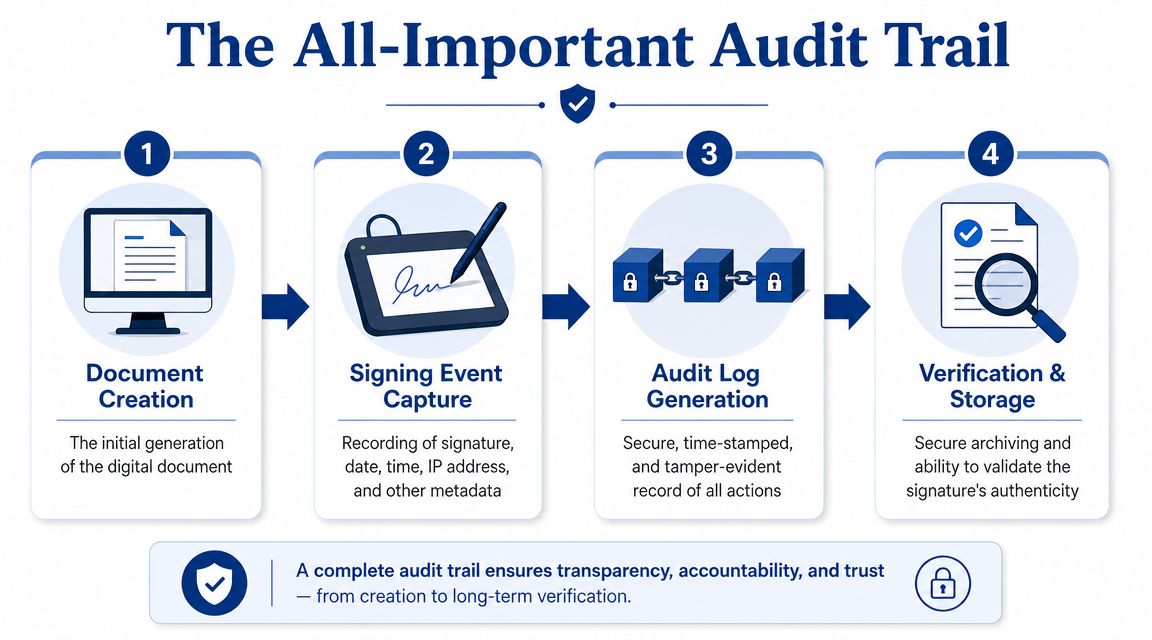
What an audit trail actually contains
Courts and legal guidance focus on proof of intent and record integrity over the visual form of a signature, and the defensibility of an e-signature often depends on the audit trail, including timestamps, device data, and version history, as described in Sirion's explanation of legal signatures.
In practical terms, a useful audit trail often answers questions like these:
When was the document sent?
You want a record of delivery and access, not just a memory that “we emailed it.”When was it opened and reviewed?
Viewing events help establish that the signer had access to the record they later signed.What exact version was signed?
If the document changed after review, that matters. Version history reduces confusion.When did the signature event occur?
A timestamp helps reconstruct the sequence.Can the completed record still be reproduced?
If you can't retrieve the executed copy and related log, your evidence weakens quickly.
Why a signature image is weak evidence
A pasted image of a signature may look formal, but it often proves very little by itself. It can be copied, forwarded, dropped into another file, or challenged without much surrounding context.
A real audit trail changes the conversation. Instead of arguing over the shape of a signature, you can point to a record of actions attached to the document lifecycle.
“Legal” is the starting point. “Provable” is what matters when someone disputes the deal.
Platform selection proves critical. If you're relying on a generic PDF editor, scattered emails, and manually saved attachments, you may end up with fragments instead of a coherent record. A dedicated e-signature workflow should preserve the signing path, the completed copy, and the evidence that ties them together.
That's also why businesses with occasional signing needs shouldn't dismiss platform quality just because their volume is low. One contested contract can matter more than a hundred smooth ones.
Common Pitfalls and Important Exceptions
Businesses get into trouble when they hear “e-signatures are legal” and stop there. That statement is too broad to guide a real transaction.
The better question is whether the signature method fits the document, the jurisdiction, and the risk level.
Where businesses make avoidable mistakes
One common error is weak consent. If the signer never clearly agreed to transact electronically, you've left a hole in the process.
Another is poor attribution. If all you can show is that a document came back with a name typed at the bottom, you may struggle if the signer later says someone else had access to the email or file.
A third problem is record loss. Businesses often complete the transaction, then fail to store the final executed document and related evidence in a reliable way. By the time a disagreement surfaces, staff have changed, inboxes are messy, and no one can reconstruct the history with confidence.
Documents that need extra caution
As Osborne Clarke's discussion of electronic signature limits puts it, the core question isn't just whether e-signatures are legal. It's which signature method is acceptable for the exact document in the exact jurisdiction. The same discussion notes that many high-stakes documents, including wills and certain real estate filings, can involve carve-outs, and standards vary by country and document type.
That means you should slow down when you're dealing with documents such as:
Wills and similar estate documents
Certain family law documents
Some deeds, filings, or real estate records
Documents involving notarization or formal witnessing requirements
If you handle leases, this article on whether you can sign a lease electronically is a useful example of why document-specific review matters.
Don't ask, “Can I e-sign documents?” Ask, “Can I use this method for this document, under these rules, with enough proof if challenged?”
That one shift in wording prevents a lot of expensive mistakes.
Your Checklist for a Legal Document Signature
A good signature process should do one job well. It should leave you with evidence you can still rely on months or years later if someone questions the deal.
That is the provability test. A signed document matters, but the stronger record is the package behind it: who signed, when they signed, what version they saw, and what system captured the event.
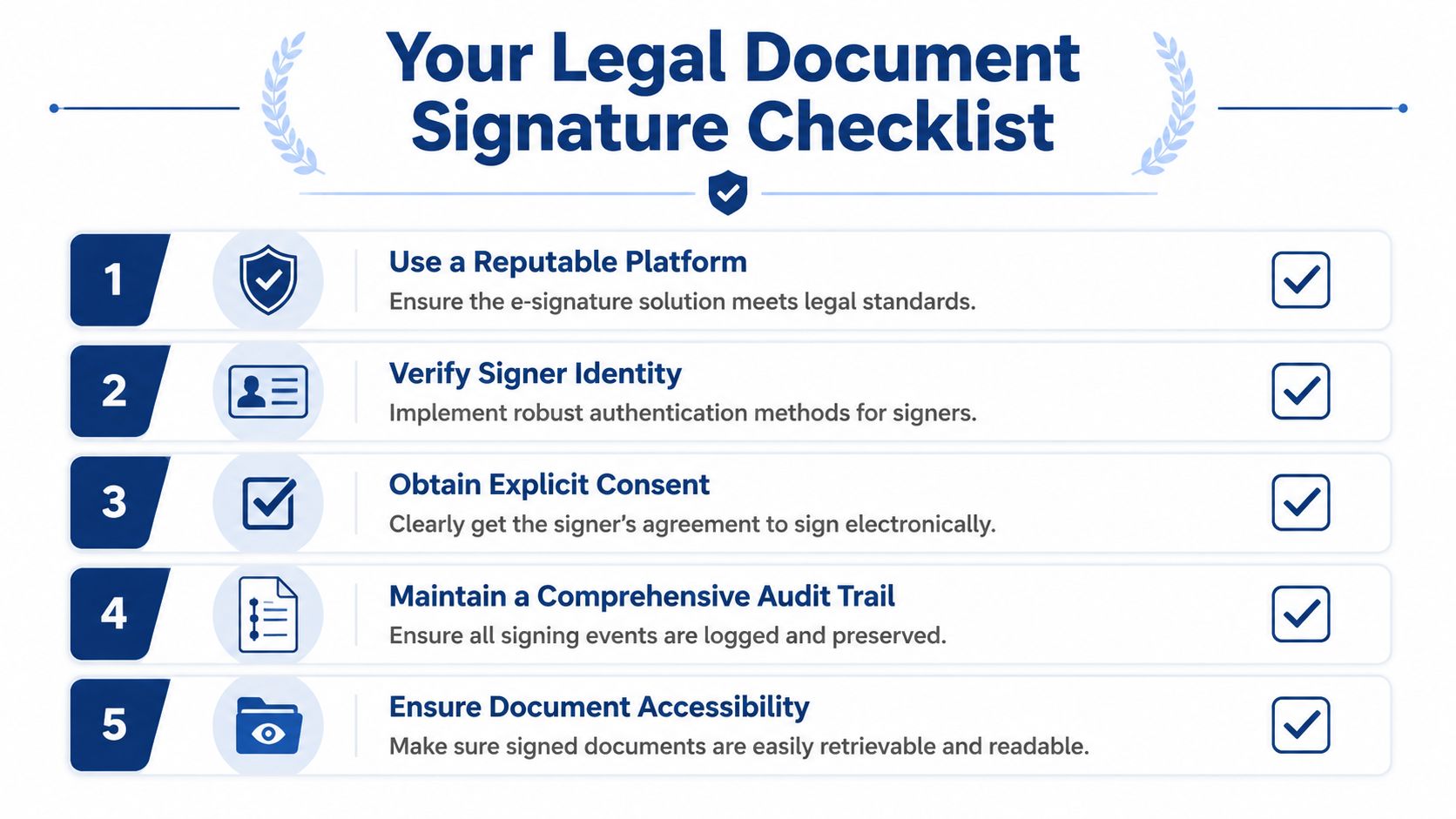
Platform checklist
Confirm ESIGN and UETA alignment
For U.S. business use, choose a platform that supports workflows designed to fit ESIGN Act and UETA requirements.Check for detailed audit trails
Do not settle for a final PDF alone. You want a record of signing events, timestamps, document history, and other data that helps reconstruct what happened if a dispute arises.Review signer experience
A confusing process leads to abandoned documents, incomplete fields, or signatures tied to the wrong email. The signing flow should be easy to complete on common devices.Verify storage and retrieval
A signed file is only useful if your team can locate the executed copy and its supporting records without digging through inboxes.Match the tool to your usage pattern
Some companies need approval routing and high-volume sending. Others need occasional signatures with clear records they can defend later. SignWith offers pay-per-document electronic signatures with ESIGN Act and UETA compliance, audit trails, archived copies, and signer access on any device.
A short walkthrough can help if your process still feels manual:
Process checklist
Use the final version before sending
Send one fixed version. If people sign different drafts, you create an argument over what was agreed to.Make the signer's action obvious
The signing step should clearly show that the person is adopting the document, not just viewing it or clicking through a form.Capture electronic consent cleanly
If your platform can record consent as part of the signing flow, use that method instead of relying on scattered email threads.Keep completion records together
Store the executed document and its audit information in the same place. A contract without its history is like a receipt without a date.Send all parties the completed copy
This reduces later confusion and gives each signer the same reference point.
If your team needs a practical setup example, this complete guide to how to eSign a document is a useful companion to the checklist.
Treat signatures as a recordkeeping process, not just a closing step. If a signer later says, "I never agreed to that version," your goal is to produce a clear file that answers the question without depending on anyone's memory.
